
AI Santa Video Generator
AI Santa video generator: add a photo of your living room or front door and Santa walks in, leaves a present or says a name. From 63 credits, with sound.
AI Santa Video Generator on Cicadas turns one image into a 5, 10 or 15 second video with MiniMax H3 Max, at 480P or 768P, with sound. A clip costs from 63 credits, and the exact quote shows before you generate. Model samples on Cicadas: 4, latest 2026-10-30.
- From 63 credits per clip
- Image to video
- 5s / 10s / 15s
- 480P
- Audio available
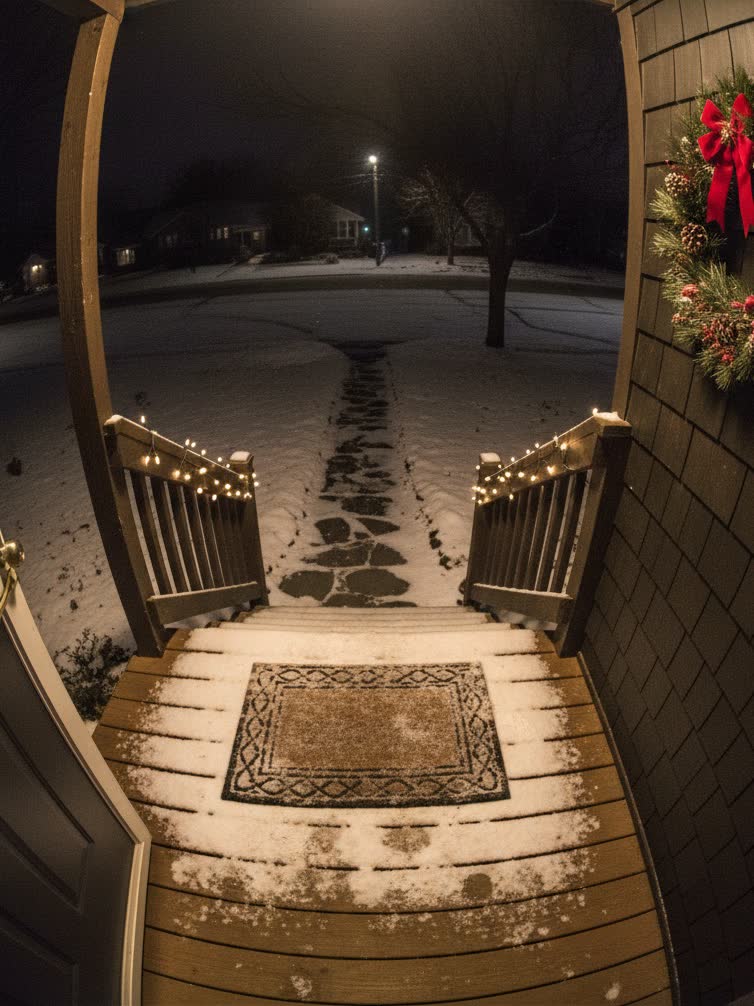 Your room or front door
Sample result
5s · MP4About AI Santa video on Cicadas
The AI Santa video generator starts from your own photo: a phone picture of the living room with the tree, or a still from the doorbell camera. That photo is the first frame, so the room in the clip is your room, and Santa walks into it: he puts a finger to his lips at the door, leaves a present under the tree, or waves and says a first name you typed. Cicadas makes it with MiniMax H3 Max: 5, 10 or 15 seconds, always with sound; a 5-second clip is 63 credits. No photos of people are needed, and the page is not a video call or a ready-made message service: you get one short MP4.
The AI elf video is the other December character, and the AI dog video has a Christmas scene for your own dog. The New Year video follows a week later; the AI holiday video generator collects the whole season. For a winter greeting without Santa, the snow globe video puts you or your pet inside a shaken globe. The Christmas filter adds a Santa hat or string lights to your own photo, and the Christmas card video turns a photo into a moving card.
AI Santa video examples made on Cicadas
Santa at the front door, caught on the doorbell camera.
MiniMax H3 Max, 5 seconds with sound, from one photo: a still from a doorbell camera of a snowy porch at night; back in 13 seconds. The clip keeps the 3:4 shape of the photo. Santa comes into view close to the lens with a red sack on his shoulder, walks onto the mat, turns, looks straight at the camera with a finger to his lips, then bends down with a wrapped present. The porch, the lights on the railing and the wreath stay as in the photo. The sound is slow footsteps and a rustle; there are no bells, although the prompt asked for them.
Use this recipe ↗A present under the tree, and a look back.
MiniMax H3 Max, 5 seconds with sound, vertical, from one phone photo of a living room with a lit tree and a fireplace; back in 49 seconds. Santa walks in from the right with a sack on his back, crosses in front of the fireplace, kneels by the tree and puts a present with the others, then looks back over his shoulder at the camera. The tree, the stockings and the sofa in the foreground stay as in the photo. The wink the prompt asked for is too small to see. The sound is heavy footsteps and rustling paper, with no bells.
Use this recipe ↗"Merry Christmas, Emma!" close to the lens.
MiniMax H3 Max, 5 seconds with sound, vertical, from the same living-room photo; back in 37 seconds. Santa steps in from the right, comes right up to the lens, waves and says "Ho ho ho! Merry Christmas, Emma! See you very soon." word for word (two automated listeners), with soft chimes behind the voice. He fills the frame, so most of the room is hidden behind him.
Use this recipe ↗Night vision: Santa crosses the dark room on the home camera.
MiniMax H3 Max, 5 seconds with sound, vertical, from the same living-room photo. Within the first second the colour picture fades into a grainy black-and-white night-vision view; Santa, his eyes glowing in the infrared light and his suit keeping a faint red tint, walks across from the tree and comes right up to the lens with his sack. The tree, the stockings, the fireplace and the chair keep their places. The sound is very quiet (mean level about -54 dB) and nobody has checked by ear what it contains.
Use this recipe ↗Why use Cicadas for AI Santa video
Santa walks into your own photo
The photo you add is the first frame of the clip, so the porch, the tree and the furniture are yours. In our recorded clips Santa came in from the edge of the frame on his own: onto a snowy porch seen through a doorbell camera, and into a living room with a lit tree. The room, the lights and the stockings on the mantel stayed as in the photo.
Four scenes, one with a spoken name
Caught on camera: he stops, looks at the lens and puts a finger to his lips. Presents under the tree: he kneels and leaves one. Says a name: he waves and says "Ho ho ho! Merry Christmas, Emma! See you very soon." Change Emma to the name you want. In our recorded clip he said the line word for word (two automated listeners), and he walked right up to the lens to say it. Night vision: the room turns into a grainy black-and-white security-camera view and he walks up to the lens with glowing eyes.
See the price of every clip first
At 480P, 5 seconds is 63 credits, 10 seconds is 125 and 15 seconds is 188; at 768P they are 100, 200 and 300. A failed generation returns its credits.
How to use AI Santa video
- 01
Sign in and add one photo of the room or the front door, with no people in it.
- 02
Pick a scene. For the spoken line, change the name in quotes; then check the quote.
- 03
Generate. Save the MP4 from the result or from My videos.
Santa caught on camera: a fictional holiday scene
Upload your own room or front-door photo with no people in it, then describe one quiet Santa arrival in a fixed wide security-camera view, or pick Night vision for the black-and-white infrared look of a home camera after dark. This is AI holiday entertainment, not real surveillance evidence. Add accurate captions or dates in your editor.
Video from Santa: a personalised message from your own living room
A video from Santa on this page is one short MP4 drawn from your photo. Pick Says a name, change Emma in the prompt to the first name you want, keep the line short and generate: Santa steps into the room in the photo, waves and says the line in a warm voice that MiniMax H3 Max makes for the clip, with his mouth moving to the words. In our recorded clip he said "Ho ho ho! Merry Christmas, Emma! See you very soon." word for word, and he walked up close to the lens to say it. A 5-second clip at 480P is 63 credits, about US$0.62 with the first pack of 1,000 credits for US$9.90; 10 seconds is 125 credits and 15 seconds 188. Save the MP4 from My videos and send it in any messaging app. Our doorbell clip kept the 3:4 shape of its photo.
How much does an AI Santa video cost, and how long does it take?
The cheapest AI Santa video is 63 credits: MiniMax H3 Max, 5 seconds at 480P, with the quote shown before you generate; a clip can also be 10 or 15 seconds. Our doorbell clip came back in 13 seconds and the two living-room clips in 37 and 49 seconds. Watching and downloading the examples on this page costs nothing.
What photo does the AI Santa video generator need?
A photo of a place with no people in it: the living room with the tree, or a still from the doorbell camera. That photo is the first frame, so the room in the clip is your room and Santa walks into it. Do not upload a photo of your child: the name Santa says is typed as text.
What can Santa say in the video?
Pick Says a name and change Emma in the prompt to the first name you want. In our test Santa said "Ho ho ho! Merry Christmas, Emma! See you very soon." word for word. One short English line and one name were tested; a longer message or another language has not been run, and a name with an unusual spelling may be pronounced differently.
What a personalised Santa video here cannot do
It is not a video call, a Santa app or a ready-made message service, and this page has no caption or name overlay: the name is spoken, and any on-screen text is added in your own editor. Santa says one short line at most; we recorded one English name, and a name with an unusual spelling may come out differently. The page takes a photo of a place, not of a person: do not upload a photo of your child, and Santa cannot be made to look like a relative or anyone else. The voice is generated by the model, not a recording of an actor, and the sound cannot be switched off. Every clip is private in My videos, and the credits come back if a generation fails.
AI Santa video prompt ideas
Copy one into the prompt box above and adapt it to your shot. Or write your own shot by shot in the prompt generator.
“The photo is the first frame, and the camera does not move. Santa Claus, an old man with a full white beard in the traditional red suit with white fur trim, a black belt, black boots and a red hat, walks quietly into view carrying a big red sack over his shoulder. He stops, looks straight at the camera, smiles and raises a finger to his lips, then sets a wrapped present down. The place stays exactly as in the photo: the same light and the same objects, and nothing else changes. One continuous shot, no cuts. Sound: soft footsteps and faint sleigh bells, no music, no voices. No other people, no text.”
“The photo is the first frame, and the camera does not move. Santa Claus, an old man with a full white beard in the traditional red suit with white fur trim, a black belt, black boots and a red hat, tiptoes into the room carrying a red sack, kneels by the Christmas tree and places a wrapped present under it, then looks over his shoulder at the camera and winks. The place stays exactly as in the photo: the same light and the same objects, and nothing else changes. One continuous shot, no cuts. Sound: soft footsteps, rustling wrapping paper and faint sleigh bells, no music, no voices. No other people, no text.”
“The photo is the first frame, and the camera does not move. Santa Claus, an old man with a full white beard in the traditional red suit with white fur trim, a black belt, black boots and a red hat, steps into view, faces the camera, waves and says in a warm, deep, jolly voice: "Ho ho ho! Merry Christmas, Emma! See you very soon." His mouth moves with the words. The place stays exactly as in the photo: the same light and the same objects, and nothing else changes. One continuous shot, no cuts. No music. No other people, no text.”
“The photo is the first frame, and the camera does not move. Within a second the picture fades into the grainy black-and-white night vision of an indoor security camera, the room now dark and lit only by its infrared glow. Santa Claus, an old man with a full white beard in the traditional red suit with white fur trim, a black belt, black boots and a red hat, tiptoes across the room with a big sack over his shoulder, his eyes glinting in the infrared light, glances up at the camera in surprise and hurries out of view. The room keeps the same layout and objects as in the photo. One continuous shot, no cuts. Sound: the faint hum of the camera and soft creaking footsteps, no music, no voices. No other people, no text.”
AI Santa video FAQ
Tested on Cicadas · reviewed 2026-10-12
Recorded on 2026-10-12 with MiniMax H3 Max image-to-video through fal.ai, each request sent once with the exact scene prompt of this page, 5 seconds at 480P with sound, from two AI-made, fictional photos of a home: a doorbell-camera still of a snowy porch and a phone photo of a living room with a lit tree. Caught on camera (the porch; the clip keeps the 3:4 shape of the photo): back in 13 seconds. Presents under the tree: 49 seconds. The spoken name: 37 seconds. In all three the place stayed as in the photo and Santa walked in from the edge of the frame; for the spoken line he came right up to the lens. Sound (two automated listeners): footsteps and rustling on the two scenes without speech, and no bells although the prompts asked for them; the line "Ho ho ho! Merry Christmas, Emma! See you very soon." word for word, with soft chimes behind the voice. The spoken line was also recorded once on Veo 3.1 Fast (6 seconds, 720p, with sound), where Santa stayed at full height in the room; that clip is not shown and the model is not offered here, because the provider marks that endpoint as deprecated on 2026-10-22. Not tested: real photos of a home, photos with people in them, other names, daylight photos, 10 and 15 seconds, and 768P.
Updated Nov 16, 2026 · How we test
Related guides
Related tools
 MiniMax H3 Max · Recorded Cicadas sample
AI Cat Video Generator
AI cat video generator: add one photo of your cat and it flips pancakes, rides a skateboard or types at the office in a 5-second clip with sound. 63 credits.
MiniMax H3 Max · from 63 credits
Tested 2026-11-10
 MiniMax H3 Max · Recorded Cicadas sample
AI Dog Video Generator
AI dog video generator: add one photo of your dog and it surfs, opens a Christmas present or paints at an easel in a 5-second clip with sound. 63 credits.
MiniMax H3 Max · from 63 credits
Tested 2026-11-10
 MiniMax H3 Max · Recorded Cicadas sample
Gender Reveal Video Maker
Gender reveal video maker: pick pink or blue and get a 5-second clip with sound: a balloon pop, a cake slice or confetti cannons. 63 credits. No photo needed.
MiniMax H3 Max · from 63 credits
Tested 2026-10-12
 MiniMax H3 Max · Recorded Cicadas sample
AI Elf Video Generator
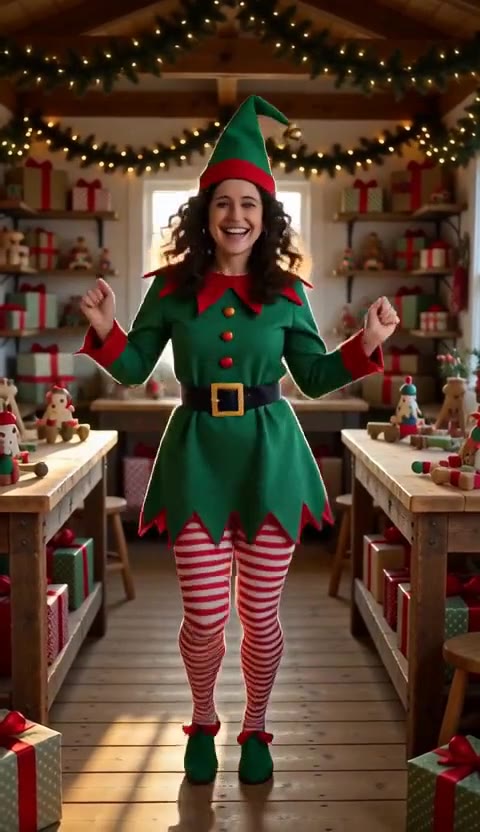
AI elf video generator: one photo of you becomes a Christmas elf dancing in a toy workshop or wrapping presents, 5 seconds with sound. 63 credits.
MiniMax H3 Max · from 63 credits
Tested 2026-10-14
More AI video trends
- Hug My Younger Self AI
- Meet Your Older Self AI
- AI Grow Up Video Generator
- AI Hug Video Generator
- AI Birthday Video Maker
- Talking Pet AI
- Pet to Human AI
- Rainbow Bridge AI Video
- AI Age Progression Video
- AI Cat Video Generator
- AI Dog Video Generator
- Gangnam Style AI Dance
- AI Halloween Video Generator
- Rumpelstiltskin AI video
- Cat Jam AI
- AI Pet Halloween Costume
- AI Outfit Change Video
- Caught at the Window AI
- AI Halloween Costume
- Flying Car AI Video
- AI Cat Dance
- Bad Times AI
- AI Muscle Video
- Clapping Cat AI
- AI Couple Video
- AI Diwali Video Generator
- AI Thanksgiving Video
- AI Christmas Video Generator
- AI Elf Video Generator
- AI New Year Video Generator
- Chinese New Year AI Video
- AI Valentine Video Generator
- AI Easter Video
- Mother's Day AI Video
- Father's Day AI Video
- AI Anniversary Video Maker
- AI Graduation Video
- Burning Bridges AI Video
- Tiny Desk AI Video
- Dog Dance AI
- 80s AI Video Generator
- AI Action Figure Video
- Earth Zoom Out AI
- Car Alarm AI Dance
- Bulin 47 AI
- Gender Reveal Video Maker
- Raindance AI
- Babydoll Dance AI
- AI dance video
- Gas Station Dance AI
- Hotel Lobby AI
- AI Zombie Trend
- Zombie Couple Video
- Human Pigeon AI
- Heads Will Roll Dance AI
- Popcorn Volcano AI Video
- AI ASMR video
- AI Bigfoot video
- AI rap video
- All AI video trends