
Caught at the Window AI Video
Make the caught at the window AI trend from one photo of you, your pet or your product: a night push-in to a lit window, a glare, the curtain shuts.
Caught at the Window AI turns one photo of you, your pet or your product into the window peeper trend: at night the camera pushes in to a lit apartment window, the subject looks up with an annoyed stare and the curtain closes. MiniMax H3 Max draws the scene around your photo; 10 seconds at 480P is 125 credits, about $1.24 on the $9.90 first pack, quoted before you generate.
- From 63 credits per clip
- From your photos
- 5s / 10s / 15s
- 480P
- Audio available
Sample result
10s · MP4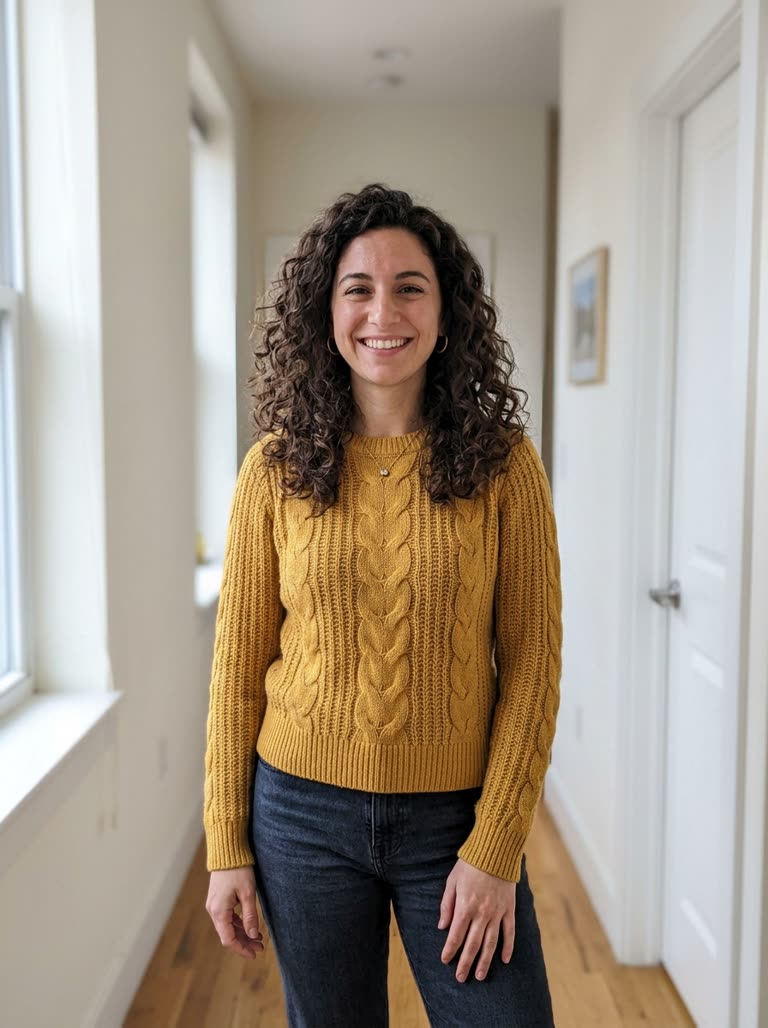 Your photo
About caught at the window AI on Cicadas
The caught at the window trend, also called the window peeper trend, the AI curtain ad or the YAKALANDIN trend, is a short night clip filmed as if from the building across the street. The camera drifts toward one lit window, catches someone in the middle of a private treat, they glare back and the curtain swings shut. Brands use it as an ad that ends on their product; most people use it on themselves or their pet. This page makes it from one photo. Pick the person, pet or product scene, add a clear photo, and MiniMax H3 Max builds the night street, the window and the stare around it, in a vertical clip of 10 seconds by default.
For your pet in a costume rather than a window, the AI pet Halloween costume page has three scenes, and the AI cat video and AI dog video pages have more for the same animal. To put your own photo into a scene you write yourself, use AI reference to video; the MiniMax H3 page lists what the model behind this page costs per second.
Caught at the window AI examples made on Cicadas
Caught mid-slurp at the window.
MiniMax H3 Max reference to video, 10 seconds at 480P with sound, vertical, from the site's sample photo of a woman; back in about 41 seconds. The camera starts across the street on a block of lit windows and pushes in to one where she sits slurping noodles, freezes, stares into the lens, stands and pulls the curtain shut. Her curly hair and yellow sweater match the photo. The noodle cup carries made-up lettering. The sound was not listened to.
- Your photo
The cat at the window stops chewing.
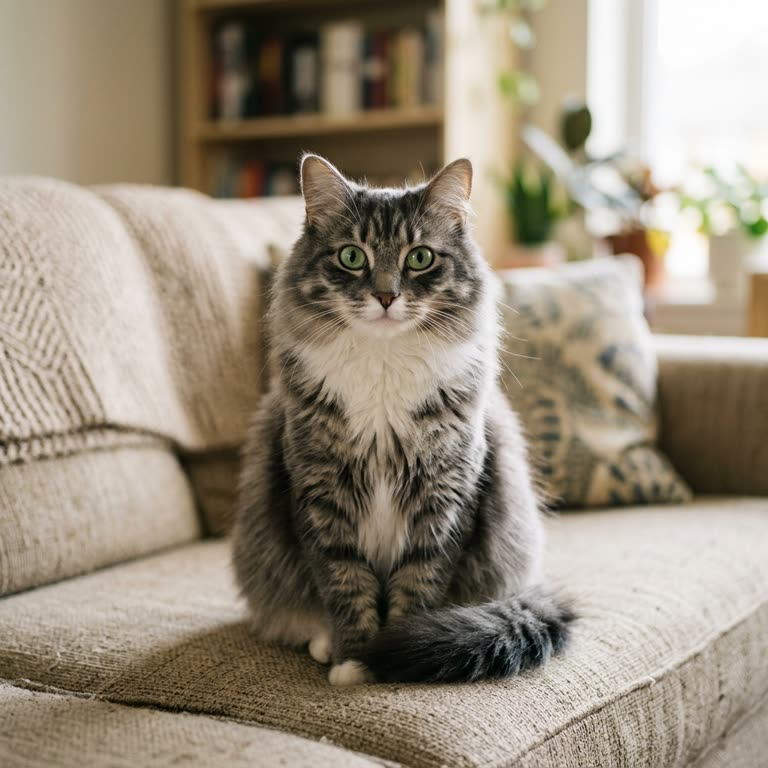
MiniMax H3 Max reference to video, 10 seconds at 480P with sound, vertical, from the site's sample photo of a tabby; back in under a minute. The camera crosses a wet street toward a ground-floor window where the cat eats from a bowl on the sill, comes close as it sits up and looks straight at the lens, and a sheer curtain swings across it. Grey stripes, white chest and green eyes match the photo. The sound was not listened to.
 Your photo
Why use Cicadas for caught at the window AI
You, your pet or your product in the window
The photo is a reference, not the first frame, so the model can place your subject inside a lit window seen from across the street. The person scene asks the model to keep your face, hair and clothes; the pet scene the face, coat and markings; the product scene its shape, colours and packaging while a generated person enjoys it. In our two clips her hair and sweater, and the cat's stripes and eyes, matched the photos; the product scene is not recorded yet.
The push-in, the stare, the curtain
Each scene asks for the same beats as the trend: a slow push-in at night, a freeze, a straight look into the lens and the curtain closing. Both recorded clips hit them: she pulls the curtain shut, and on the cat a sheer curtain swings across. The prompts are fixed; you choose the scene, not the wording.
Made for the curtain ad
For a product clip, upload a clean packshot. Lettering that the model draws often comes out garbled, so treat the label in the clip as a placeholder and lay your real logo or end card over it in an editor; the curtain closing leaves a dark frame that suits an end card.
Price before you generate
At 480P, 10 seconds is 125 credits, about $1.24 on the $9.90 first pack of 1,000 credits; 5 seconds is 63 and 15 seconds is 188, and 768P raises them to 100, 200 and 300. The quote sits on the button, and a failed job returns its credits.
How to use caught at the window AI
- 01
Sign in and pick a scene: Midnight noodles (a person), Treats on the windowsill (a pet) or Curtain ad (a product).
- 02
Add one clear, well-lit photo of yourself, your pet or your product, keep 10 seconds or choose 5 or 15, and check the quote.
- 03
Tick the photo confirmation, generate, and download the MP4 from My videos; add your logo or end card in an editor if it is an ad.
Window peeper with a pet
The pet scene is the gentlest version of the window peeper trend: your dog or cat sits on a lit windowsill crunching treats, stops when the camera arrives, gives the lens a flat look and the curtain drops in front of it. Use a photo where the face and coat are sharp; in our tabby clip the grey stripes, white chest and green eyes came through from the photo.
Turning the trend into a curtain ad
In the ad version the payoff is the product, not the person. Shoot or export a clean packshot, pick the Curtain ad scene and let the generated viewer clutch it while glaring at the camera. Expect the printed label to drift; keep the clip for the moment and the glare, and finish it with your own logo over the closed curtain.
Which photo works best
Faces looking roughly toward the camera, even light and nothing covering the subject give the model the most to keep. Group photos, sunglasses and heavy filters make the person harder to hold; for a product, one item on a plain background beats a shelf of them.
Caught at the window AI prompt ideas
These are the tested scenes on this page. Each scene is fixed and its prompt is read-only: pick one above, or press “Use this prompt”.
“Night in the city, vertical, one continuous shot. The camera starts across the street from a tall apartment building and slowly pushes in toward a single warmly lit window on an upper floor. Inside, the person from Image 1 sits at a small table happily slurping a big bowl of instant noodles. As the camera reaches the glass they freeze mid-bite, look straight into the lens with an annoyed, unimpressed stare, hold it for a beat, then stand up and pull the curtain shut. Keep the person's face, hair and clothes as in the photo. Sound: distant traffic, then the swish of the curtain, no music. No other people, no text, no logos.”
“Night in the city, vertical, one continuous shot. The camera starts across the street from a small apartment building and slowly pushes in toward a warmly lit ground-floor window. Inside, the pet from Image 1 sits on the windowsill crunching treats from a little bowl. As the camera reaches the glass it stops chewing, looks straight into the lens with a flat, unimpressed stare, holds it, and then the curtain drops shut in front of it. Keep the pet's face, fur colour and markings exactly as in the photo. Sound: distant traffic and crunching, then the swish of the curtain, no music. No people, no text, no logos.”
“Night in the city, vertical, one continuous shot. The camera starts across the street from a tall apartment building and slowly pushes in toward a single warmly lit window. Inside, a young adult in pyjamas sits on a sofa enjoying the product from Image 1, holding it up with obvious delight. As the camera reaches the glass they freeze, look straight into the lens with an annoyed stare, hold the product a little closer as if guarding it, then pull the curtain shut. Keep the product's shape, colours and packaging as in the photo. Sound: distant traffic, then the swish of the curtain, no music. No text added to the scene, no other logos.”
Caught at the window AI FAQ
Tested on Cicadas · reviewed 2026-11-02
2026-11-02: two samples recorded (docs/research/claude-window-20261102/samples/, owner cap USD 1.00, two requests at USD 0.50 list price): MiniMax H3 Max reference to video, 10 seconds at 480P, vertical, sound on, one site sample photo each. Midnight noodles (sample woman) and Treats on the windowsill (sample tabby) both ran the push-in from across the street, the stare and the curtain; the woman's hair matched the photo, her sweater did not come from it, and the noodle cup shows invented lettering. Not run: the Curtain ad (product) scene, 5 and 15 seconds, 768P. The audio was measured, not listened to.
- MiniMax H3 Max reference-to-video API specification
- media.io: caught at the window AI ad (trend description, read 2026-11-02)
Updated Nov 3, 2026 · How we test
Related tools
 MiniMax H3 Max · Recorded Cicadas sample
AI Pet Halloween Costume Video
Put your pet in a Halloween costume: add one photo of your dog or cat and get a short video of it as a pumpkin, a witch or a bat. 63 credits. Pets only.
MiniMax H3 Max · from 63 credits
Tested 2026-10-15
 MiniMax H3 Max · Recorded Cicadas sample
AI Halloween Video Generator
AI Halloween video generator: a glowing pumpkin, a hallway ghost or a dancing skeleton as a 5-second vertical clip with sound. 63 credits, no photo needed.
MiniMax H3 Max · from 63 credits
Tested 2026-10-13
AI Reference to Video: Consistent Characters
AI Reference to Video: Consistent Characters. Make a 5–15 second clip with MiniMax H3 Max. Start at 63 credits; inspect the quote and download from My videos.
MiniMax H3 Max · from 63 credits
 MiniMax H3 Max · Recorded Cicadas sample
AI Cat Video Generator
AI cat video generator: add one photo of your cat and it flips pancakes, rides a skateboard or types at the office in a 5-second clip with sound. 63 credits.
MiniMax H3 Max · from 63 credits
Tested 2026-10-12
More AI video trends
- Hug My Younger Self AI
- Meet Your Older Self AI
- AI Grow Up Video Generator
- AI Hug Video Generator
- AI Birthday Video Maker
- Talking Pet AI
- Pet to Human AI
- Rainbow Bridge AI Video
- AI Age Progression Video
- AI Cat Video Generator
- AI Dog Video Generator
- Gangnam Style AI Dance
- AI Halloween Video Generator
- Rumpelstiltskin AI video
- Cat Jam AI
- AI Pet Halloween Costume
- AI Outfit Change Video
- AI Halloween Costume
- Flying Car AI Video
- AI Cat Dance
- Bad Times AI
- AI Muscle Video
- Clapping Cat AI
- AI Couple Video
- AI Santa Video Generator
- AI Diwali Video Generator
- AI Thanksgiving Video
- AI Christmas Video Generator
- AI Elf Video Generator
- AI New Year Video Generator
- Chinese New Year AI Video
- AI Valentine Video Generator
- AI Easter Video
- Mother's Day AI Video
- Father's Day AI Video
- AI Anniversary Video Maker
- AI Graduation Video
- Burning Bridges AI Video
- Bulin 47 AI
- Gender Reveal Video Maker
- Raindance AI
- Babydoll Dance AI
- AI dance video
- Gas Station Dance AI
- Hotel Lobby AI
- AI Zombie Trend
- Zombie Couple Video
- Human Pigeon AI
- Heads Will Roll Dance AI
- Popcorn Volcano AI Video
- AI ASMR video
- AI Bigfoot video
- AI rap video
- All AI video trends