
Claude Motion Graphics Without a Team Plan: Prompt In, MP4 Out
Claude Motion Graphics prompt: free templates and MP4 export. Optional AI writing: 25 credits, changes 20. Account needed; unusable scenes refunded.
- Free export
- optional paid AI
Loading the editor…
Real results (2026-10-10, Chrome): each video below is a file this page exported. The companies and products in them are made up.
About Claude motion graphics on Cicadas
The free manual workflow: Claude Motion, the animated-explainer feature Anthropic released in beta on October 8, 2026, is included in Team and Enterprise plans only. This page is a way to make the same kind of video, an explainer built from text, shapes, charts and counters instead of generated footage, with Claude on any plan. Describe what to explain and copy the prompt. Paste it into Claude, which answers with a description of the animation. Paste that answer here and the page draws it and writes an MP4 in your browser. It is free, nothing is uploaded, and no account is needed. This is not Claude Motion and Cicadas is not affiliated with Anthropic. In our test on 2026-10-10, six scenes written by Claude models from this prompt all passed the page's check on the first answer, and each 15 to 20 second video took 3 to 10 seconds to make in Chrome. Templates, manually pasted scenes, browser rendering and MP4 export are free; image files stay on your device. Optional onsite AI writing costs 25 credits, a change 20, and needs an account. Your description and scene text go to Cicadas and fal/Claude and are saved privately to your account. An unusable scene, or a new scene with the wrong shape or length, returns the credits.
The templates behind this page live on the AI motion graphics generator and the AI explainer video generator; the Higgsfield Katana alternative uses the same renderer for a different job, and the logo animation maker animates a logo file.
Why use Cicadas for Claude motion graphics
Claude writes it, this page draws it
The prompt asks Claude for a motion scene: a JSON description of every layer (text, boxes, circles, lines and arrows, counting numbers, bar charts, your own images) with when it appears, how it enters and how it moves. The page checks the description field by field and draws each frame on a canvas. Nothing in the answer is run as a program, so pasting a scene cannot do anything except draw.
Tested with three Claude models
On 2026-10-10 we gave the prompt, with four different briefs, to Claude Opus, Claude Sonnet and Claude Haiku: six answers in all, each taken as first written. All six passed the check and rendered. The four from Opus and Sonnet are the videos on this page, unedited. The two from Haiku were valid but laid out badly, with text running outside its box and off the edge of the frame, so we recommend Sonnet or Opus. We ran the models through Claude Code, not through the Claude app on a Free or Pro plan.
Change a word without starting over
Like Claude Motion, the video is built from parts, not from generated footage, so the words and numbers are exactly the ones you gave. Every text in the scene has its own box under the preview: fix a typo or a figure and the preview updates. For timing, colour or layout, tell Claude what to change and paste the new answer.
How to use Claude motion graphics
- 01
Write what the animation should explain, with the exact numbers and wording you want on screen. Pick the shape and the length, then copy the prompt.
- 02
Paste the prompt into Claude (any plan) or another chat model, and copy its whole answer back into step 2 on this page.
- 03
Watch the preview, edit any words, then click Make MP4 and download the file.
Example briefs to start from
Choose “Written by a chat model”, then copy an example into step 1 and replace it with your own content. Or fill in a template directly.
“How a URL shortener works, in three steps: someone pastes a long link; the service stores it under a short code; anyone who opens the short link is sent on to the long one. Dark navy background with a lime accent.”
“Q3 results for our coffee subscription. Revenue $4.2M, up 18% on Q2. Subscribers: 61,400. Churn: 2.1%. Monthly revenue in $M: Jul 1.2, Aug 1.4, Sep 1.6. Warm cream background, dark brown text.”
“A launch teaser for our note-taking app, Margin. Tagline: "Notes that find themselves". Three features: instant search, linked pages, offline first. Ends on "Available October 20".”
What it costs
| This page: templates, checking and MP4 export | Free | No account, no watermark, no limit on exports. It runs on your device. |
|---|---|---|
| Have Cicadas write the scene | 25 credits a scene, 20 credits a change | Written on this page by Claude Sonnet in about a minute. Credits are returned if no usable scene comes back. Needs an account. |
| A chat model to write a custom scene | Whatever plan you already have | The prompt is a normal chat message of about 3,000 characters. We tested Claude Opus, Sonnet and Haiku. |
| Claude Motion (Anthropic, beta) | Team: $20 per seat a month billed annually, 2 seats minimum | Included in Team and Enterprise plans only; counts toward the plan's usage limits. Not on Free, Pro or Max. |
| AI video with generated footage on Cicadas | Credits, shown before each generation | For scenes, people and camera moves rather than text and charts. |
Claude prices are from Anthropic's pricing page as read on 2026-10-10 and can change; check the page before you buy.
Claude motion graphics FAQ
Tested on Cicadas · reviewed 2026-10-10
Checked on 2026-10-10. What is said here about Claude Motion comes from Anthropic's announcement, help article and pricing page as they read that day; we have not used Claude Motion itself, so this page does not compare the quality of the two. Our own tool was tested as follows. The prompt was given, with four briefs (a three-step explainer, quarterly results with given numbers, a vertical launch teaser, and compound interest in Chinese), to Claude Opus, Claude Sonnet and Claude Haiku through Claude Code: six answers, each used as first written. All six passed the page's check. The four from Opus and Sonnet (22 to 29 layers) rendered as readable, paced explainers and are shown here unedited; in the two from Haiku (13 and 26 layers) text overflowed its boxes and the frame. In Chrome on a production build, the four examples were exported through the page: 15 to 20 seconds at 1920 × 1080, 1080 × 1920 and 1080 × 1080 took 3 to 10 seconds each and gave 1.3 to 2.1 MB files that ffmpeg read as H.264 at 30 frames per second with no sound track. No network request was sent while exporting. Not tested: the Claude app on a Free or Pro plan, other chat models, Safari, Firefox, a real phone, and scenes that use image files beyond one check that an added file is drawn.
- Anthropic — Claude Dashboards and Motion (announcement, 2026-10-08)
- Claude Help Center — Get started with Claude Motion
- Claude pricing (plans that include Claude Motion)
Updated Oct 27, 2026 · How we test
Related guides
Related tools
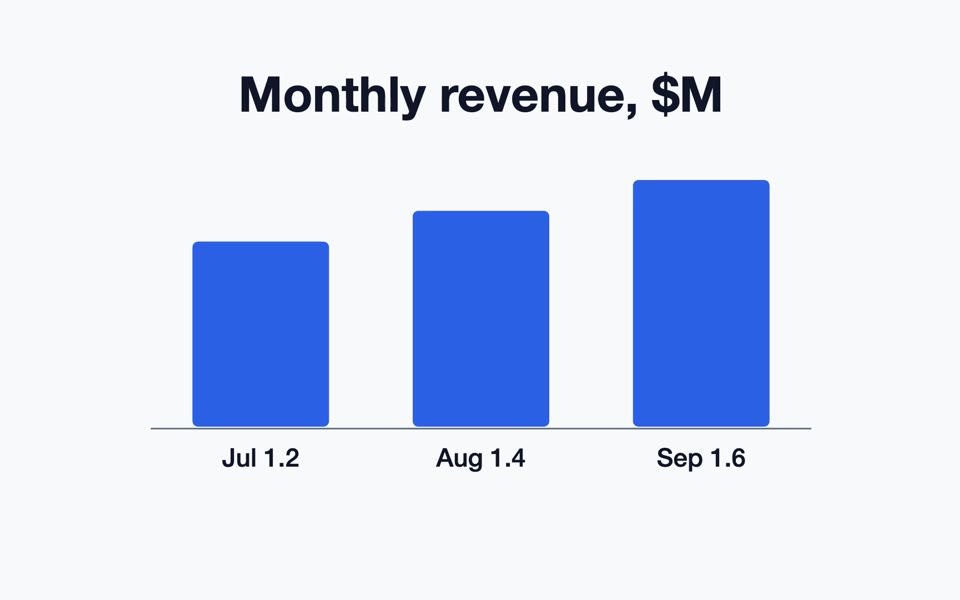 A bar chart made from a template
AI Motion Graphics Generator: Type It, Get an Animated MP4
Free AI motion graphics generator: fill a template (steps, big number, bar chart, launch teaser, quote) or let a chat model write the scene. MP4, no watermark.
Free · runs in your browser
Tested 2026-10-10
 A step-by-step explainer from a template
AI Explainer Video Generator: Explain It in Steps, Download an MP4
Free AI explainer video generator: type a title and two to four steps and get an animated explainer, or have a chat model write one. No watermark, no upload.
Free · runs in your browser
Tested 2026-10-10
 Intros and outros from your own logo file
Logo Animation Maker: Animate Your Logo, Letters Untouched
Free logo animation maker: upload a PNG or SVG, pick fade, pop, rise, wipe, focus or shine, and download an MP4 intro or outro. No watermark, no upload.
Free · runs in your browser
Tested 2026-10-18
Higgsfield Katana Alternative
A free Higgsfield Katana alternative: Claude on any plan writes a motion-graphics video and this page renders the MP4. No subscription, manual browser rendering.
Free · runs in your browser
Tested 2026-10-14