
Creative workflows
Jatayu Video Prompt: 3 Tested Prompts You Can Copy
Three Jatayu AI video prompts, each run once on our own sample photos: the cliff reveal, the temple landing and the flyover, with what came out.
Video examples here were generated on Cicadas and keep their model, settings and date. Cicadas earns money when you generate with these models. How we test
- Test window:
- 2026-09-27 – 2026-11-17
- Clips recorded with these models:
- 192
- Models:
- MiniMax H3 Max
- Their provider cost:
- ≈$57.08
- Selection:
- every clip we keep is listed with its settings, cost and request ID; failed or discarded runs are listed in the test record.
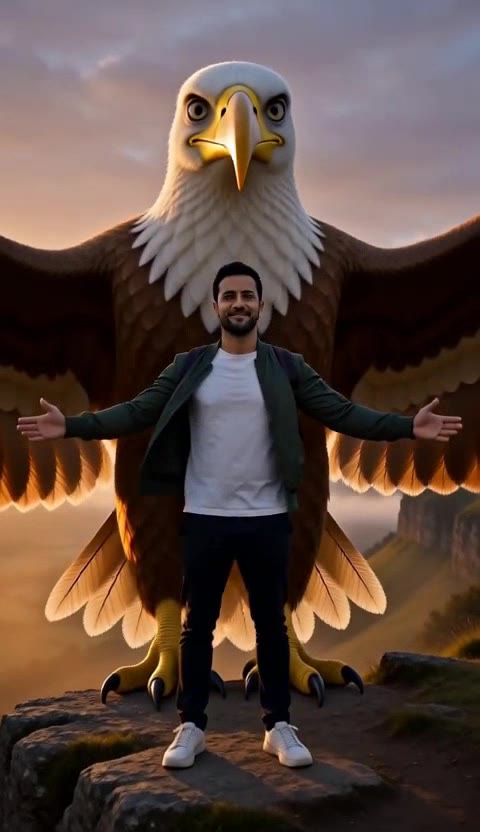
Short answer: a Jatayu video prompt describes one place, one action for the person from your photo, the moment the great bird appears, the camera move and the sound, and asks the model to keep the face from the photo and draw no text. Below are three prompts I ran once each on reference to video, with the clips they produced and what did not go to plan.
I first came across the Jatayu edit on YouTube. What makes it work is the emotional link: Jatayu is the bird who flew at Ravana to save Sita in the Ramayana, so seeing him rise behind you means something to a lot of viewers. When I tried the trend myself, I got garbled text in the frame and a face that did not look like my photo. The three prompts below are written to avoid both.
What the Jatayu video trend is
In the clips going round on Instagram and YouTube, a person stands on a cliff, a rooftop or temple steps, spreads their arms or raises a hand, and a giant bird appears behind them, often at sunset. The bird is Jatayu, the vulture king of the Ramayana. Several of the tutorials we read make it in Google Flow from a selfie and a reference video. On the trend board we use, searches for "jatayu video prompt" start on 14 November 2026.
Two problems, and the lines that fix them
| Problem | What causes it | Line to add |
|---|---|---|
| The face does not look like you | A text-only prompt, or a photo used as a loose hint | Use a reference photo and write "Keep his face, hair and clothes exactly as in the photo" |
| Garbled letters appear | Signs, banners or titles in the scene | End with "No music, no text" and leave signs out of the place |
Prompt 1: the cliff reveal
The man in Image 1 stands at the edge of a rocky cliff above a misty valley at sunset, facing the camera, and slowly spreads both arms wide. Behind him Jatayu, the colossal divine vulture of the Ramayana: vast golden-brown wings, a white-feathered neck and head, a strong curved beak and wise, calm eyes rises from below the cliff edge with its wings fully open, filling the sky, and its shadow falls over him. Keep his face, hair and clothes exactly as in the photo. Low-angle shot, slow push in. Sound: strong wind and one deep wingbeat. No music, no text.
What came out: he spreads his arms within the first second, the wings come up from behind the rocks, and by the middle of the clip the bird stands behind him, its head well above his, wings spread across the frame. His beard, green jacket, white T-shirt and smile match the photo.
What did not: the bird came out as a giant white-headed eagle with a yellow beak and yellow feet, closer to an American bald eagle than to the vulture the prompt names. It stands on the rock behind him rather than hovering.
Prompt 2: the temple landing
The woman in Image 1 stands on the stone steps of an ancient temple at dawn, golden light and drifting mist around her. Jatayu, the colossal divine vulture of the Ramayana: vast golden-brown wings, a white-feathered neck and head, a strong curved beak and wise, calm eyes glides down from the sky and lands beside her, folding its great wings; she turns to it and joins her hands in a respectful namaste. Keep her face, hair and clothes exactly as in the photo. Wide shot, slow orbit around them. Sound: temple bells far away and the rush of wings. No music, no text.
What came out: the bird descends with its wings spread over the misty temple, lands on the stone platform beside her and folds its wings, and in the last second she looks up at it with her hands joined. Her curls and mustard sweater match the photo. This is the clip I would post.
What did not: the same eagle look as in the first clip. The camera moves round a little rather than making a full orbit.
Prompt 3: the flyover
The man in Image 1 stands on a hilltop above the clouds at golden hour and raises one hand toward the sky. Jatayu, the colossal divine vulture of the Ramayana: vast golden-brown wings, a white-feathered neck and head, a strong curved beak and wise, calm eyes sweeps low over him in slow motion, its wingtips almost brushing the grass, as he looks up in awe. Keep his face, hair and clothes exactly as in the photo. The camera starts behind him and tilts up to follow the bird. Sound: wind and a long wingbeat. No music, no text.
What came out: seen from behind, he raises a hand as the bird glides in from the left above a sea of clouds; then the view changes to a closer side shot of him looking up, smiling, as it passes overhead. He wears a backpack; the photo shows its shoulder straps.
What did not: the change of view about halfway through is a hard cut, not the tilt the prompt asked for. If you want one continuous shot, add "one continuous shot, no cuts".
How to make it from your photo
- Open reference to video and add one clear photo of yourself, or of an adult who agreed. The page opens at 5 seconds, 480P and 9:16, the settings of our three clips.
- Paste one of the prompts above. Keep "The man in Image 1" or "The woman in Image 1" so the model uses your photo.
- Change the place if you like, and keep the last two lines: the "Keep … exactly as in the photo" line and "No music, no text".
- Check the quote and generate. A 5-second clip at 480P is 63 credits, about $0.62 on the $9.90 first pack. Our three came back in under 30 seconds each.
- Watch the face and the bird before you post. If the bird looks wrong, add "a vulture, not an eagle" to its description and run it again.
For a clip that starts from your exact photo as the first frame instead, use image to video. For a written prompt of your own, the AI video prompt generator fills in the place, action, camera and sound for you.
The parts of a Jatayu prompt
| Part | Example from above | Why it is there |
|---|---|---|
| Who | The man in Image 1 | Ties the person to your photo |
| Place and light | Rocky cliff above a misty valley at sunset | The trend lives on height and warm light |
| One action | Slowly spreads both arms wide | One clear move reads better in five seconds |
| The bird | Vast golden-brown wings, a white-feathered neck and head | Without a description the model draws any large bird |
| How it appears | Rises from below the cliff edge | The reveal is the moment people share |
| Camera | Low-angle shot, slow push in | Low angles make the bird look huge |
| Sound | Strong wind and one deep wingbeat | The model makes sound with the clip, so ask for it |
| Guard rails | Keep his face …; No music, no text | Fixes the two common failures |
Jatayu is a revered figure for many viewers, so I wrote him as noble and protective, not as a joke, and kept the person respectful in every scene.
What I did not test
Ten- and fifteen-second clips, 768P, more than one take per prompt, the same prompts in Google Flow, the "a vulture, not an eagle" line, and photos of anyone other than our two AI-made sample adults. The sound of the clips was described by two automated listeners: wind or whooshing in the cliff and flyover clips, and in the temple clip a whoosh and, to one of them, a cheering crowd, with no speech or music in any; nobody listened to them.
Questions
What is a Jatayu video prompt?
It is the text you give an AI video model to make the trending Jatayu edit: a person from your photo stands somewhere high and open, and Jatayu, the great bird of the Ramayana, rises or lands behind them. A good prompt names the place, one action for the person, how the bird appears, the camera and the sound, and keeps the person's face from the photo.
Can I make a Jatayu video from my own photo?
Yes. Use a reference-to-video tool, which draws the person from your photo into a new scene, and start the prompt with "The man in Image 1" or "The woman in Image 1". On our reference to video page a 5-second vertical clip at 480P is 63 credits. Use your own photo or one of an adult who agreed.
Why does my face change in the Jatayu video?
Usually because the model was given only words, or a photo it treats as a loose hint. In our two clips with the sample man, made from a reference photo with the line "Keep his face, hair and clothes exactly as in the photo", his face, beard and jacket stayed recognisable. A clear, front-facing photo in even light helps most.
Why is there strange text in my Jatayu video?
Video models invent lettering when a scene has signs, banners or titles in it. End the prompt with "No music, no text" and leave out shop fronts, posters and on-screen titles; add any caption in your editor afterwards. None of our three clips shows any lettering.
Tools used in this guide
- AI Reference to Video: Consistent CharactersAI Reference to Video: Consistent Characters. Make a 5–15 second clip with MiniMax H3 Max. Start at 63 credits; inspect the quote and download from My videos.
- AI Video Prompt Generator: One Brief, Fitted to the ModelFreeFree AI video prompt generator: fill in subject, action, camera, look and sound, pick a model, get a prompt within its limits and open it in the generator.
- AI Image to Video GeneratorPhoto to video from one upload: add a JPG, PNG or WebP and get a silent 5-second Kling or 6-second 720p Veo MP4. AI image to video with the price shown first.