
Creative workflows
How to Make a Rap Video From a Photo With AI, Then Lip Sync Your Own Rap
Two tested routes: one photo plus two lines of your own lyrics becomes an 8-second rap clip, or a video you already have is lip synced to a rap track.
Video examples here were generated on Cicadas and keep their model, settings and date. Cicadas earns money when you generate with these models. How we test
- Test window:
- 2026-09-08 – 2026-11-13
- Clips recorded with these models:
- 201
- Models:
- Veo 3.1 Fast, MiniMax H3 Max
- Their provider cost:
- ≈$67.88
- Selection:
- every clip we keep is listed with its settings, cost and request ID; failed or discarded runs are listed in the test record.
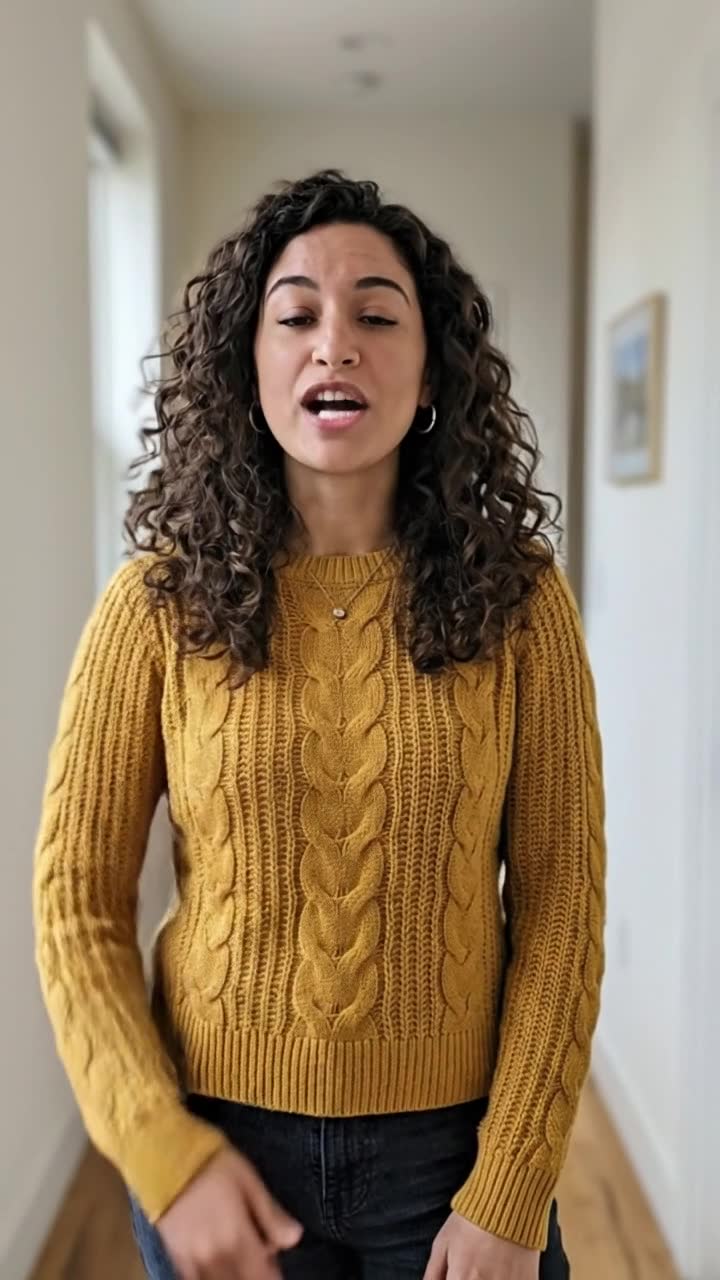
Short answer: for a rap clip from one photo, open the AI rap video page, choose Image to video, upload your photo, pick the Your own photo scene, swap in two lines of your own lyrics, turn sound on and generate. Veo 3.1 Fast returns an 8-second vertical clip with a rapped vocal; the scene also asks for an original beat. If you already have a video of yourself and a rap you recorded, use AI lip sync instead: it re-times the mouth in your video to your track. Below are the clips we made for this post on November 13, 2026, what matched, and what did not.
This post is by the people who run Cicadas and links to our own tools. All clips come from the site's AI-made sample photos, not from real customers. What we say about the picture comes from frames we looked at; what we say about the words comes from an automatic listener (fal Wizper) that was not shown the lyrics. Nobody listened for the music, the voice or the mix, so we do not describe them.
Route 1: one photo, the model raps
Step 1: choose the photo
The photo becomes the first frame, so the clip starts exactly where your picture is. Pick one with the face turned toward the camera and even light. Both of our sample photos showed the hands, and both clips used them for gestures. Use a photo of yourself or of an adult who agreed to appear; photos of children and of celebrities are not accepted.
Step 2: write two lines
An 8-second clip fits two short lines. In the woman's clip below, the second line ended at about 6 seconds (word timestamps from an automatic listener) and the clip ran on for two more. Write the lines in quotation marks inside the prompt, as the Your own photo scene does:
An original adult character, or the authorized subject when a first-frame photo is provided, raps in the scene over an original simple hip-hop beat. Preserve the subject identity, use small hand gestures and a gentle head nod, locked medium shot. The performer raps two short original lines: "Streetlights glow, I found my flow." "Small steps today, big dreams on the way." Original characters or my own authorized adult photo only. No celebrity likeness. No face swap. No voice imitation. Use only original lyrics and original music. No text or logos. One continuous shot. Generate an original beat and an original non-imitative voice.
That is the scene word for word, and it is what the page sends to the model. Replace only the two quoted lines with yours.
Step 3: generate and check
We used the page defaults: 8 seconds, 9:16, 720p, sound on. Each clip was sent once.
The man's clip: he raps on a street of brick terraces and shop fronts, gestures with one hand and later puts it on his chest. The listener wrote down "Streetlights glow, I found my flow. Small steps today, big dreams on the way." His face, green jacket and white T-shirt match the photo. What differed: the scene asks for a locked shot, and the camera drifted with him along the street instead.
The woman's clip: she raps in a bright hallway, points at the camera and then at herself. The listener again wrote down both lines word for word. Her face, curls and mustard sweater match the photo. What differed: she steps closer to the camera in the middle of the clip and back again at the end, so the framing changes.
Two clips are a small test. They show the route works with these photos and these lines, not that every take will land every word.
Route 2: your own rap on a video you already have
Route 1 gives you the model's voice and sound. If you want your own voice, or a track you made, the rap page cannot do that: it has no audio upload. The lip sync page does. It takes a video with one clearly visible face plus your audio, and Sync Lipsync 2 changes the mouth to follow the audio while the rest of the video stays.
For our sample we used the woman's rap from Route 1 as the track, so you can hear the same two lines. The video was a different clip of her: 10 seconds of her chatting about her weekend, made from the same photo with MiniMax H3 Max, the model behind the talking photo page. We cut both files to 6.3 seconds, because the page asks for lengths within 0.25 seconds of each other and does not loop anything to fill a gap.
What came out: at the same moments, her mouth shapes differ from the source clip, while her face, hair and the hallway stay as they were. We compared frames; we did not check the mouth against every word. The listener wrote down both rap lines word for word from the result. The source and the result play side by side on the lip sync page. Our track was the whole sound of the rap clip, not a clean vocal; the page's own advice is speech without background music, and we have not compared the two.
Which route to pick
- You have a photo and want the whole thing made for you: Route 1. The voice, the sound and the gestures come from the model.
- You recorded your own rap: Route 2. Film yourself talking or mouthing along for the same length, then lip sync it to the recording.
- You have only a photo and your own recording: the talking photo page can take a voice recording and make the person in the photo speak along to it. We have not tried it with a rap, so we cannot tell you how well the mouth keeps up with fast lines.
- You want a longer song: neither page makes one. A Veo clip is at most 8 seconds and lip sync takes up to 60 seconds; join clips in an editor.
- You want a cartoon, a pet or a robot to rap: the rap page has text-to-video scenes for original characters, no photo needed.
How to do it on Cicadas
- Pick one clear photo of yourself or of an adult who agreed.
- Open the AI rap video page, choose Image to video and the Your own photo scene.
- Replace the two quoted lines with your own, keep sound on and check the quote: 300 credits for 8 seconds.
- Watch and listen to the whole clip; download it from My videos.
- For your own voice instead, go to AI lip sync, upload a video and your recording trimmed to the same length, and confirm the per-second quote.
Cost: Veo 3.1 Fast with sound is 300 credits for 8 seconds, about USD 2.97 on the first credit pack (150 for 4 seconds, 225 for 6). Lip sync is 12.5 credits per second of video, 80 credits for our 6.33-second sample. Both pages show the exact quote before anything is charged, and a failed job returns its credits.
Questions
How do I make a rap video from a photo with AI?
Open the AI rap video page, choose Image to video, upload a photo of yourself or of an adult who agreed, pick the Your own photo scene, replace the two lines with your own lyrics, turn sound on and generate. Veo 3.1 Fast makes an 8-second vertical clip with a rapped vocal from that photo; the scene also asks for an original beat.
Will the clip rap my lyrics word for word?
In our two recorded clips it did: an automatic listener wrote down both lines exactly as written in the prompt. Keep it to one or two short lines for an 8-second clip, and listen to the whole result before you share it, because the model can still drop or change a word.
Can I use my own recorded rap instead of a generated voice?
Yes, on the lip sync page: upload a video with one clearly visible face plus your recording, trimmed to the same length within 0.25 seconds, and Sync Lipsync 2 re-times the mouth to your track. The rap page itself does not take an audio upload.
How much does a photo rap video cost?
On Cicadas, an 8-second Veo 3.1 Fast clip with sound is 300 credits, about USD 2.97 on the first credit pack; 4 seconds is 150 and 6 seconds is 225. Lip sync is 12.5 credits per second of video, so our 6.33-second sample would quote 80 credits.
Can I make it sound like a famous rapper or use a real song?
No. Both pages are for original lyrics and original music: no celebrity faces, no voice imitation, no copied lyrics or existing recordings. Use your own words, and on the lip sync page your own recording or a track you have the rights to.
Tools used in this guide
- AI Rap Video GeneratorAI rap video generator: rap videos with original characters or your own photo. Battles, pets, Mandarin rap and North American styles. No celebrity likeness.
- AI Lip SyncMake a talking-head video match new speech and get a private MP4 back. This AI lip sync tool runs Sync Lipsync 2 and costs 12.5 credits per second of video.
- AI Talking Photo GeneratorTalking photo from one picture of you: type a line and the person in the photo says it in a 5-second clip, or attach your own recording. MiniMax H3 Max, 63 credits, adults only.