
Creative workflows
GTA 6 Filter as a Video: 3 Tested Prompts From One Photo
Turn one photo into a GTA 6 filter video: the loading-screen look, a neon night street and an in-game follow shot, each run once, with the prompts to copy.
Video examples here were generated on Cicadas and keep their model, settings and date. Cicadas earns money when you generate with these models. How we test
- Test window:
- 2026-09-27 – 2026-11-17
- Clips recorded with these models:
- 192
- Models:
- MiniMax H3 Max
- Their provider cost:
- ≈$57.08
- Selection:
- every clip we keep is listed with its settings, cost and request ID; failed or discarded runs are listed in the test record.
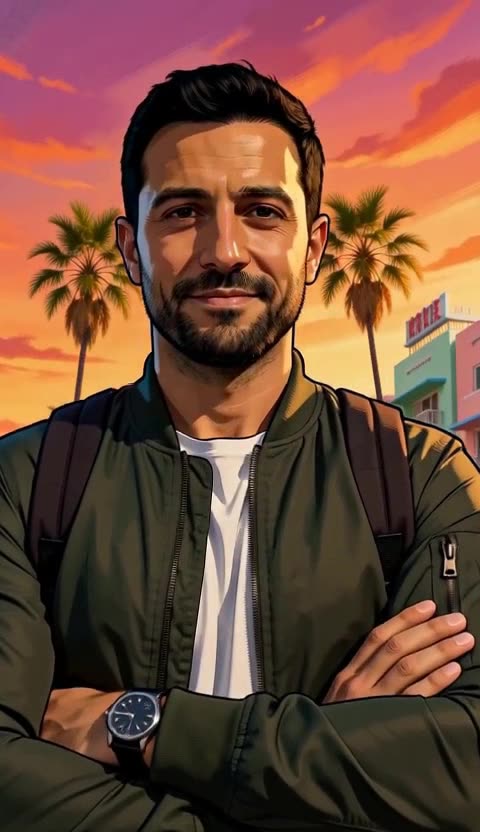
Short answer: the GTA 6 filter restyles a photo of you as game art. To get it as a video, give one clear photo to reference to video and describe the look instead of naming the game: inked outlines, cel-shaded colour, palm trees and a magenta sunset. Below are three prompts we ran once each on a sample photo, with the 5-second clips they produced. Each clip is 63 credits. This is a fan trend; Cicadas is not affiliated with the game or its makers.
What the GTA 6 filter is
People have been posting pictures of themselves drawn as if they were in the game. Two looks go round. The first is the loading-screen look: a hand-painted illustration with bold black outlines, flat cel-shaded colour and a hot coastal sunset. The second is the in-game look: a realistic third-person screenshot, as if the camera were following you down the street. Most guides make a still image in a chat or image app from one selfie and a pasted prompt; Magic Shot's guide covers photos and video.
On the keyword board we use, searches for "gta 6 filter" jumped on 18 November 2026 and peaked on 19 November.
This is a fan trend, not an official filter. Grand Theft Auto and GTA are trademarks of their owners; Cicadas is not connected with Rockstar Games or Take-Two. Our prompts do not name the game or its characters, and each one ends with "no text, no logos". The clips show our own two sample adults, who are AI-made.
Prompt 1: the loading-screen look
Hand-painted digital illustration in the style of an open-world crime game loading screen: bold black ink outlines, cel-shaded colour, hard-edged shadows, a sun-bleached palette of magenta, coral, orange and turquoise. The man in Image 1 stands on a beachfront street at sunset with palm trees and pastel art deco hotels behind him, arms crossed, and slowly turns his head to look at the camera with a slight smirk. Keep his face, hair and clothes exactly as in the photo. Low-angle medium shot, slow push in. Sound: distant traffic, seagulls and a warm breeze. No music, no text, no logos.
What came out: a clean illustrated look with dark outlines and flat shading, palm trees, pastel hotels and a pink and orange sky. He starts with his head turned away, arms crossed, then turns to the camera with a half smile while the view pushes in to his face. His beard, green jacket, white T-shirt and backpack straps match the photo. Of the three, this is the one we would post.
What did not: the small sign on the hotel carries made-up letters, even though the prompt says no text.
Prompt 2: the neon night street
Hand-painted digital illustration in the style of an open-world crime game loading screen: bold black ink outlines, cel-shaded colour, hard-edged shadows, a sun-bleached palette of magenta, coral, orange and turquoise, at night with pink and purple neon. The woman in Image 1 leans against a parked convertible on a wet city street lined with neon signs that carry no words, and brushes her hair back as the reflections ripple on the road. Keep her face, hair and clothes exactly as in the photo. Medium shot, slow orbit to the right. Sound: light rain, a car passing, a low city hum. No music, no text, no logos.
What came out: she leans on a pale convertible on a wet street, brushes her hair back and smiles, while the camera moves round until the street runs away behind her in pink and purple reflections. Her curls, mustard sweater and jeans match the photo.
What did not: every neon sign carries garbled letters, although the prompt asks for signs "that carry no words". The look is also softer than the first clip, closer to a painted 3D scene than to inked outlines.
Prompt 3: the in-game follow shot
Photorealistic third-person video game screenshot look: the camera follows a few steps behind and slightly above the man in Image 1 as he walks along a sunny beach boardwalk with palm trees, parked sports cars and joggers, then he glances back over his shoulder at the camera. Keep his face, hair and clothes exactly as in the photo. Smooth follow camera, bright midday light, saturated colour. Sound: waves, footsteps on wood, distant voices. No music, no text, no logos, no on-screen interface.
What came out: the camera follows behind him along a sunlit boardwalk with palm trees, parked sports cars and joggers, and from about 3 seconds he turns, looking back over his shoulder with a smile by the end. For the first three seconds you see only his back; when he turns, his face and beard match the photo. No health bar, map or other on-screen interface appears.
What did not: it looks like ordinary realistic video, not clearly like a game. If you want the game feel, the loading-screen look reads much more strongly.
How to make it from your photo
- Open reference to video and add one clear, front-facing photo of yourself, or of an adult who agreed; not a celebrity and not anyone who has not said yes. The page opens at 5 seconds, 480P and 9:16, the settings of our three clips.
- Paste one of the prompts above. Keep "The man in Image 1" or "The woman in Image 1" so the model uses your photo, and keep the line "Keep his face, hair and clothes exactly as in the photo".
- Change the place or the action if you like: a marina, a rooftop pool, a motel car park.
- Check the quote and generate. A 5-second clip at 480P is 63 credits, about $0.62 on the $9.90 first pack.
- Look at the face and at any signs before you post.
If you already have a GTA-style picture from an image app and only want it to move, use image to video: the clip starts from your picture as its first frame. That page runs different models at their own prices, so check its quote. For other drawn looks, see the AI anime video generator, and to have your idea arranged into a full prompt, the AI video prompt generator.
The parts of a GTA 6 filter prompt
| Part | Example from above | What it did in our clips |
|---|---|---|
| The look | Bold black ink outlines, cel-shaded colour, hard-edged shadows | Gave the illustrated look in clip 1 |
| The palette | Magenta, coral, orange and turquoise | The sunset sky and pastel hotels |
| Who | The man in Image 1 | Tied the person to the photo |
| Place | Beachfront street, palm trees, pastel art deco hotels | The coastal city the trend is known for |
| One action | Arms crossed, slowly turns his head to the camera | One clear move in five seconds |
| Camera | Low-angle medium shot, slow push in | Ended on his face |
| Guard rails | Keep his face …; no text, no logos | The face held in all three; made-up letters still appeared on signs |
What we did not test
Naming the game in the prompt, 10- and 15-second clips, 768P, more than one take per prompt, real selfies (we used our two AI-made sample adults), group photos, and the "no signs" wording. Nobody listened to the clips for us, so we do not describe their sound; a speech-to-text check found no spoken words in the first clip and, in the other two, only the filler it tends to produce when there is no speech. The "Sound:" lines in the prompts are requests; we did not verify them.
Questions
What is the GTA 6 filter?
It is an AI restyle that turns a photo of you into art that looks like Grand Theft Auto VI: either the illustrated loading-screen look, with inked outlines and a pink-and-orange coastal sunset, or a realistic in-game screenshot look. It is not an official Rockstar Games filter; people make it with AI image and video tools.
Can I make the GTA 6 filter as a video?
Yes. A reference-to-video tool draws the person from your photo into a new moving scene. We made three 5-second vertical clips this way from two sample photos; on our reference to video page a clip like that is 63 credits, about $0.62 on the $9.90 first pack.
Do I need to write "GTA 6" in the prompt?
No. None of our three prompts names the game. Describing the look worked: bold black ink outlines, cel-shaded colour, hard-edged shadows, palm trees, pastel art deco hotels and a magenta and orange sunset. Our three clips showed no logos and no game characters.
Why is there garbled text on the signs in my GTA 6 filter video?
Video models can invent lettering where a scene has signs. Our night clip asked for neon signs "that carry no words" and still came back with made-up letters on every sign. Leave signs out of the scene, for example with "neon tubes and glowing shop windows, no signs"; we have not tested that line.
Is the GTA 6 filter free?
Not here. Cicadas has no free plan: a new account gets one free watermarked video (5 seconds, 480P, on a supported page, voucher valid 7 days, daily places limited), and after that a 5-second 480P clip on reference to video is 63 credits. The quote shows on the Generate button before you spend anything.
Tools used in this guide
- AI Anime Video GeneratorAI anime video generator: describe an anime scene or upload your own art and get a silent 5- or 10-second anime video in one original shot, price shown first.
- AI Video Prompt Generator: One Brief, Fitted to the ModelFreeFree AI video prompt generator: fill in subject, action, camera, look and sound, pick a model, get a prompt within its limits and open it in the generator.
- AI Reference to Video: Consistent CharactersAI Reference to Video: Consistent Characters. Make a 5–15 second clip with MiniMax H3 Max. Start at 63 credits; inspect the quote and download from My videos.
- AI Image to Video GeneratorPhoto to video from one upload: add a JPG, PNG or WebP and get a silent 5-second Kling or 6-second 720p Veo MP4. AI image to video with the price shown first.