
Creative workflows
How to Make an Anime Video With AI: Prompts, Shots and Cost From Two Recorded Clips
How to make an anime-style video with AI from text, your own drawing or a clip you filmed: the prompt pattern behind our two recorded Kling 3.0 Pro anime shots, what held, what to check, and what a short opening costs.
Video examples here were generated on Cicadas and keep their model, settings and date. Cicadas earns money when you generate with these models. How we test
- Test window:
- 2026-09-08 – 2026-09-30
- Clips recorded with these models:
- 11
- Models:
- Kling 3.0 Pro
- Their provider cost:
- ≈$6.16
- Selection:
- every clip we keep is listed with its settings, cost and request ID; failed or discarded runs are listed in the test record.
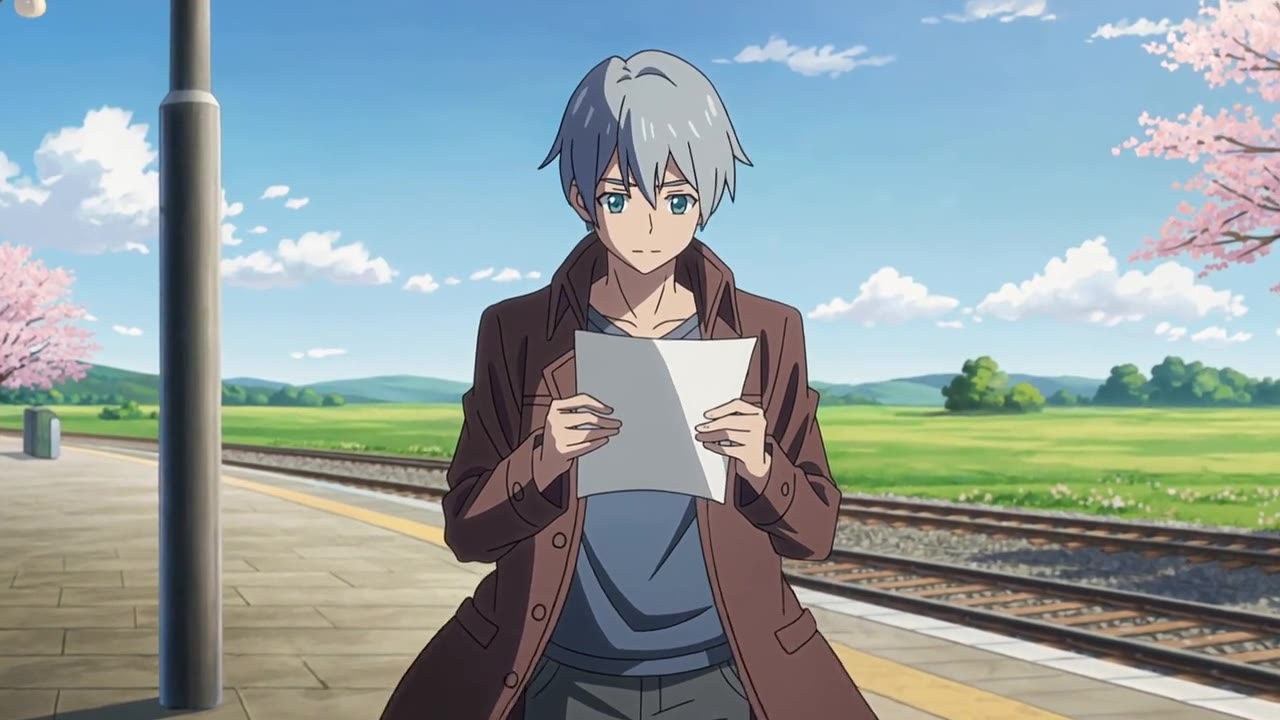
Short answer: to make an anime video with AI, write one original character doing one small action in one place, add the look you want (cel shading, painted sky, clean line art), and generate it as a single 5- or 10-second shot. On the AI anime video generator that costs 140 credits for 5 seconds. For anything longer, such as an opening, you plan several shots and join them yourself. Our two recorded clips held their line art and their character for the whole shot; neither showed the camera push-in we asked for.
We make Cicadas, so the page in this guide is ours. Everything below comes from the two anime clips we recorded on it with Kling 3.0 Pro (27 and 30 September 2026), from frame sheets we took of both on 5 November 2026, and from the page's own settings in our code. We did not test other anime generators for this post.
What you can start from
There are three starting points, and they lead to different pages:
| You have | Page | What it makes | Price |
|---|---|---|---|
| Only an idea | AI anime video generator, text to video | A new silent anime-style shot, 5 or 10 s | 140 or 280 credits |
| A drawing of your own character | AI anime video generator, image to video | Your drawing as the first frame, then motion | 140 or 280 credits |
| A clip you filmed | Video to anime | Your clip redrawn as anime, manga or painted film, sound kept | 8 credits per second of your clip |
A photograph uploaded to the anime generator becomes the first frame of the shot, as it does on every image-to-video page. The model then has to move from a photo look to a drawn look, and we have not recorded that case on this page, so we cannot tell you how cleanly it goes. If the goal is "me as an anime character", the honest routes are a drawing of yourself as the input, or filming yourself and using video to anime. Our earlier post on turning yourself into a cartoon compares the photo and clip routes for cartoon looks.
The prompt pattern behind our two clips
Both recorded clips were text to video, 5 seconds, 16:9, silent. This is the prompt of the one on the platform, exactly as sent:
Original hand-drawn anime style: a fictional young adult with short silver hair reads a letter on a quiet countryside train platform as cherry blossom petals drift past. Soft cel shading, painted sky, slow push-in, gentle wind in the hair and coat.
It follows an order that works for anime shots:
- The look first. "Original hand-drawn anime style" sets the drawing before anything else is said.
- One character, described like a model sheet. Age group, hair, one piece of clothing. The page also refuses existing franchise characters, so a description is all you need.
- One action. Reading a letter. Not reading, then looking up, then running for the train.
- The place in a few words. A quiet countryside platform.
- What moves besides the character. Petals, wind in the hair and coat. This is where anime shots get their life cheaply: hair, cloth, grass and petals move without the anatomy having to change.
- Shading and camera. Cel shading, painted sky, slow push-in.
The page then wraps your words in its own two sentences, so you do not need to type them: before your prompt it adds "Original anime-inspired scene with cel shading, clean line art and a restrained 2D animation feel.", and after it "Preserve stable anatomy and character design. One continuous shot. No existing franchise characters, logos or text." Open this recipe to start from the same settings.
What held and what did not
We cut both clips into frame sheets and looked at them side by side.
Held: the character design. In the platform clip the silver hair, the brown coat and the face stay the same drawing from the first frame to the last; the line art does not boil or shimmer. Cherry petals cross the frame and the coat moves in the wind. In the hilltop clip, a figure in a red scarf seen from behind, the scarf, the hair and the grass all move with the wind for the full five seconds and the painted clouds stay put.
Did not hold: the camera. Both prompts ask for a push-in, and in both clips the framing barely changes; the motion is all in the wind. The letter in the platform clip also changes shape a little as it is held, the kind of detail that is easy to miss at full speed and obvious on a paused frame.
Not tested by these clips: hands doing something complicated, a face in close-up turning, two characters touching, a fight. The hilltop figure is small and turned away, which hides most of what usually goes wrong. Keep your first shots in the same safe zone, then try harder actions one at a time.
To check your own clip frame by frame, export stills with the free video to frames tool, which runs in your browser.
How to build a short anime opening
A TV anime opening runs about a minute and a half. You will not get that from one prompt here, but a 20 to 30 second opening for a channel, a book trailer or a game jam is a realistic project:
- Write the character once, then paste it into every prompt. For example: "a fictional young adult with short silver hair, a long brown coat and a canvas satchel". The model does not remember earlier clips, so the description is your only continuity.
- Plan four to six shots, each one action. A wide establishing shot, the character in the wind, a close-up on a prop, the character turning to look, a sky shot for the title.
- Generate each shot at 5 seconds first. At 140 credits a shot, six shots are 840 credits. Only re-make the one that failed.
- Join the shots to a song in your video editor: lay the clips over your track and export one MP4. The anime clips are silent, so the song is the soundtrack.
- Add the title with the free text animation maker if you want animated lettering over the sky shot.
Generating text inside an anime clip is a bad idea anyway: the page asks for no text, and AI-drawn lettering tends to come out garbled.
Cost of a short opening
| Plan | Credits | With the 1,500-credit pack (US$15) |
|---|---|---|
| One 5-second shot | 140 | US$1.40 |
| One 10-second shot | 280 | US$2.80 |
| Six 5-second shots, no re-takes | 840 | US$8.40 |
| Six shots plus two re-takes | 1,120 | US$11.20 |
| Redrawing a 10-second clip you filmed with video to anime | 80 | US$0.80 |
Prices come from the page's quote (Kling 3.0 Pro, silent, 28 credits a second), which you see before anything is charged. A generation that fails, or a file that fails our check, returns its credits; a clip that arrives and that you do not like is still charged, so keep prompts small until one works. The Kling 3.0 page runs the same model with sound and other aspect ratios if you need them.
Questions
Is there a free AI anime video generator on Cicadas?
Not for new anime shots. The AI anime video generator charges 140 credits for a 5-second clip and 280 for 10 seconds, shown before you generate. A new account gets one free watermarked video (5 seconds, 480P, on a supported page, voucher valid 7 days, daily places limited), and the free browser tools such as the text animation maker cost nothing, but they do not draw anime.
How much does an AI anime clip cost?
On the AI anime video generator, a silent 5-second Kling 3.0 Pro clip is 140 credits and a 10-second clip is 280 credits. With the 1,500-credit pack at US$15, that is US$1.40 and US$2.80. Our two recorded clips cost US$0.56 each in provider fees.
Can I turn my photo into an anime video?
Two pages do two different jobs. On the AI anime video generator, an uploaded picture becomes the first frame of a new anime-style shot, so a drawing you made works better than a photograph. To redraw a clip you filmed frame by frame, use video to anime, which costs 8 credits per second of your clip and keeps your sound.
Can AI make a whole anime opening?
Not in one generation. Each clip here is one shot of 5 or 10 seconds, so an opening is a set of shots you plan, generate one by one and join to a song. The same character is not guaranteed to look identical from shot to shot, so repeat the full character description in every prompt.
Can I use a character from an existing anime?
No. The page adds a rule to every prompt that asks for an original character with no existing franchise characters, logos or text, and you are responsible for what you upload. Describe your own character instead: hair, clothes, one prop.
Do AI anime clips have sound?
Not on this page: every clip from the AI anime video generator is a silent MP4. Add music when you assemble the shots in your video editor, laying the clips over the song.
How we checked
The two clips are the anime clips recorded on Cicadas through fal.ai with Kling 3.0 Pro text to video, each sent once: anime-hilltop-scarf on 27 September 2026 and anime-platform-letter on 30 September 2026, both 5 seconds, 16:9, silent, US$0.56 each (estimated provider cost). On 5 November 2026 we cut each into eight frames spread over its length and compared them. Credit prices are read from the page's pricing in our code on the same day. For more prompt habits that carry across models, see the AI video prompt guide and how we test.