
FLUX 3 Video: Image to Video with Native AudioNew
Animate one image into a 5 to 20-second FLUX 3 video at 720p or 1080p, with optional native sound. Each FLUX 3 clip shows its credit quote before you generate.
- From 213 credits per clip
- Image to video
- 5s / 10s / 15s / 20s
- 720p
- Audio available
FLUX 3
How should the shot move?
A preset fills the prompt below. Edit it freely; results depend on your image and model.
More prompt ideas
More settings · Source image · 5s
This mode uses the shape of your input image. Upload a 9:16 image for a vertical video.
Checking generation and private storage configuration.
Sample result
5s · MP4About FLUX 3 video on Cicadas
FLUX 3 is Black Forest Labs' first video model. Upload one JPG, PNG or WebP, describe the motion, and choose 5 to 20 seconds at 720p or 1080p, with or without generated sound. The quote updates with every setting and is shown before anything is charged; a failed generation returns its credits.
FLUX 3 video examples made on Cicadas
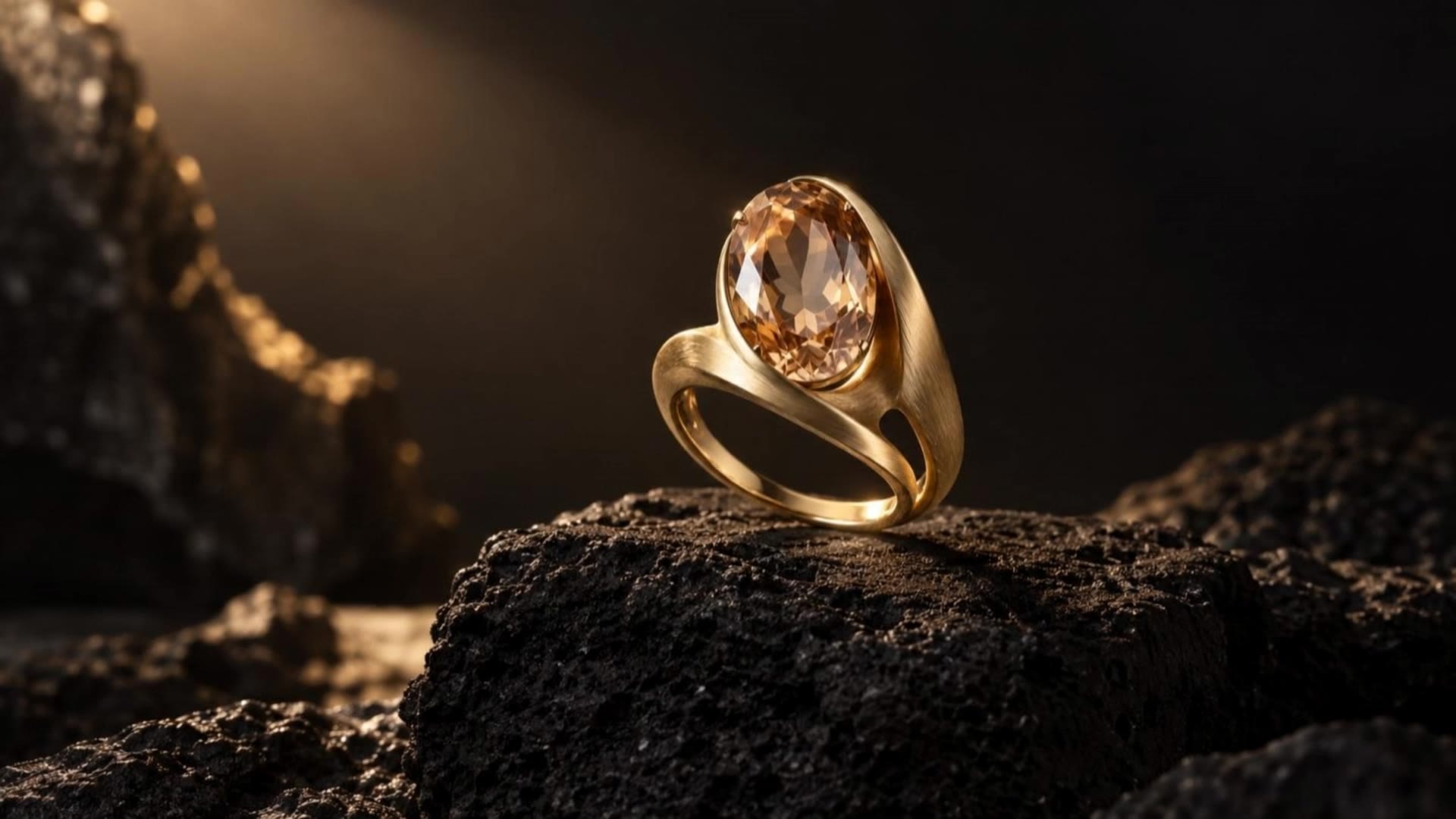
The ring, on FLUX 3.
FLUX 3 at 720p, silent, from the same ring image and prompt as the Kling and Seedance ring clips. The ring’s shape and setting hold steady, but the light barely moves in five seconds, so the clip reads almost as a still.
Use this recipe ↗Morning coffee, on FLUX 3.
FLUX 3 at 720p with sound on, from the café image and prompt of the Kling coffee clip. Steam rises and the camera eases in while the cup and croissant keep their shape; the sound the model chose is a single bird chirping.
Use this recipe ↗Why use Cicadas for FLUX 3 video
Animate an image with FLUX 3
FLUX 3 on Cicadas starts from one image you upload, and the video keeps the image's frame shape. Text-only generation is not offered for this model here.
FLUX 3 video with or without sound
Turn native audio on for ambience or effects at the same price, or leave it off for a silent clip. Listen before you publish: generated sound can differ from the prompt.
Longer FLUX 3 clips, priced up front
Choose 5, 10, 15 or 20 seconds. 720p costs 42.5 credits a second and 1080p 72.5, so a 5-second 720p clip is 213 credits.
How to use FLUX 3 video
- 01
Upload a JPG, PNG or WebP you have the right to use.
- 02
Describe one clear movement, then pick the length, resolution and sound.
- 03
Check the quote, generate, then download the MP4 from My videos.
FLUX 3 video prompt ideas
Copy one into the prompt box above and adapt it to your shot.
“The gold ring stays completely still on the stone. A narrow soft studio light slowly sweeps from left to right, making the facets of the champagne gemstone catch brief natural highlights. Camera is locked. Preserve the exact rigid ring shape, oval stone, setting and brushed gold texture. Elegant restrained jewelry commercial. No rotation, no morphing, no added jewelry, no cuts, no text.”
“Thin translucent steam rises slowly from the coffee and curls naturally in the warm side light. The camera makes a very gentle forward push toward the cup and croissant. The ceramic cup, handle, saucer and pastry remain rigid and completely stationary. Preserve all food textures. Cozy editorial food commercial, single continuous shot, no cuts, no added objects, no text.”
FLUX 3 video FAQ
Tested on Cicadas · reviewed 2026-09-30
Recorded on Cicadas on 2026-09-30: two FLUX 3 image-to-video clips, 5 seconds at 720p, 213 credits each. The ring clip (silent) used the same image and prompt as our Kling and Seedance ring clips: the ring kept its shape, but the light barely moved. The coffee clip (sound on) kept the cup and croissant intact while steam rose; the sound the model chose was a single bird chirping. 1080p, clips longer than 5 seconds and text-only prompts were not tested.
Updated Sep 30, 2026 · How we test
Related tools
 Kling 3.0 Pro · Recorded Cicadas sample
AI Image to Video Generator
Photo to video from one upload: add a JPG, PNG or WebP and get a silent 5-second Kling or 6-second 720p Veo MP4. AI image to video with the price shown first.
Kling 3.0 Pro · from 140 credits
Tested 2026-09-29
 Kling 3.0 Pro · Recorded Cicadas sample
Animate Photo AI
Make a still photo move with animate photo AI: pick one small motion and get a silent 5- or 10-second MP4. Photo to video on Kling 3.0 Pro, price shown first.
Kling 3.0 Pro · from 140 credits
Tested 2026-09-29
 Kling 3.0 Pro · Recorded Cicadas sample
Kling 3.0 Pro AI Video Generator
Turn a prompt or one image into a 5- or 10-second video with Kling 3.0 Pro. Add sound if you like and see the exact credit quote before you generate.
Kling 3.0 Pro · from 140 credits
Tested 2026-09-30