
Free tools
We Ran 8 Kinds of Logo Through 6 Animations: What Survives the GIF
Eight test logos, six motions, 48 GIFs and 8 MP4s from a free logo animation maker: which logo files come out clean, which lose their glow or lines, and the fix for each.
Video examples here were generated on Cicadas and keep their model, settings and date. Cicadas earns money when you generate with these models. How we test
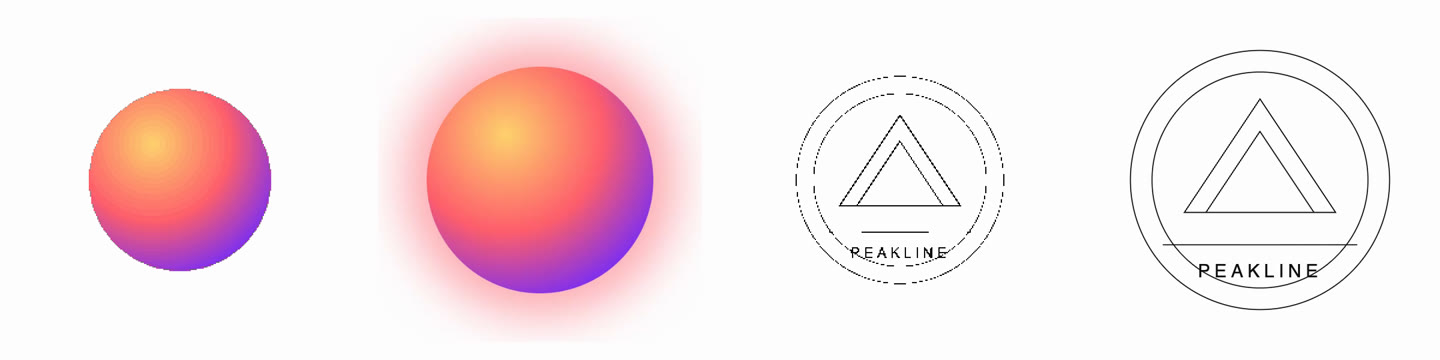
Short answer: a flat logo with a transparent background animates cleanly in every motion, as MP4 or GIF. Three kinds of file need care: a logo with a glow or soft shadow loses it in a transparent GIF, a logo with hairline strokes comes out with broken lines in the GIF, and a JPG turns the whole GIF into a square of its background colour. For those, export an MP4, or fix the file first. Below are the eight logos we tested, what came out, and the fix for each.
We make Cicadas, and the tool tested here is our free logo animation maker. It runs in the browser, so the test cost nothing but time. We ran it on the live site on November 6, 2026, in headless Chromium on a Mac at a 1280 by 900 window. The scripts that made the logos, ran the exports and measured the files are kept with the results, so the test can be run again.
The eight test logos
We drew eight made-up logos, one for each kind of file people upload. None is a real brand.
| Logo | File | What it tests |
|---|---|---|
| Flat icon | SVG, blue disc with a white tick | The easy case |
| Black mark | SVG, black rounded square with white "ON" | A dark logo on a transparent background |
| Wide wordmark | SVG, "LARKSPUR BAKERY" in dark brown serif, 1600 by 300 | A long, thin logo |
| Thin-line | SVG, circles, triangles and "PEAKLINE" drawn with hairline strokes | Lines that get thinner when scaled down |
| Gradient glow | PNG, 600 by 600, gradient ball with a soft outer glow | Partly transparent pixels: 58.1% of the file |
| Detailed emblem | PNG, 600 by 600, gradient ring, striped centre, "EST·1998" | Many colours |
| White-box JPG | JPG, 800 by 500, "TIDEWAY" on white | No transparency at all |
| Tiny favicon | PNG, 64 by 64, orange "Q" tile | A small file enlarged |
What we exported
For each logo:
- One MP4 with the page's default settings and the Fade motion. All eight came out as H.264, 1920 by 1080, 30 frames per second, 4 seconds, between 134 KB (black mark) and 569 KB (detailed emblem). Each took 0.9 to 1.9 seconds to make on our machine.
- Six GIFs, one per motion (Fade, Pop, Rise, Wipe, Focus, Shine), square, 480 pixels, with the transparent background switched on wherever the page shows that switch. All 48 came out as 480 by 480, 60 frames, 4 seconds, 15 frames per second, looping, and each took under a second.
Every export finished; nothing failed or was cut short. The differences are in how the logos look and how heavy the files are.

The strip above is the last frame of each Fade GIF on white, in the order black mark, detailed emblem, flat icon, gradient glow, thin-line, tiny favicon, white-box JPG and wide wordmark. The strip below is the same eight frames on a dark grey (#222) background.

Results by logo
| Logo | GIF size, six motions | What broke | Fix |
|---|---|---|---|
| Flat icon | 105–142 KB | Nothing | None needed |
| Black mark | 120–135 KB | Black square blends into a dark page; the white letters still read | Check it on the real background |
| Wide wordmark | 67–78 KB | Small in the GIF; hard to see on dark | Large logo size or 640 GIF |
| Thin-line | 97–114 KB | Circles come out dashed | Thicker strokes or MP4 |
| Gradient glow | 327–374 KB | Glow gone, edge stepped, gradient banded | MP4 |
| Detailed emblem | 581–657 KB | Nothing visible; heaviest file | Smaller GIF size or MP4 |
| White-box JPG | 5–31 KB | The whole GIF is a white square | Use a transparent PNG or SVG |
| Tiny favicon | 237–284 KB | Soft, blurry letter edges | Start from a larger file |
1. A glow or soft shadow disappears in the GIF
The gradient logo is a ball with a soft glow around it. In the MP4 the glow and the smooth gradient are there. In the transparent GIF the glow is gone, the ball's edge is stair-stepped, and the gradient shows visible bands; the last frame holds only 56 colours.
The cause is the format, not the motion: in a transparent GIF a pixel under half opacity is dropped and every other pixel becomes fully solid. 58% of this logo's pixels were partly transparent; the faint glow fell below half and vanished, and the edge of the ball turned into steps. That is also why Fade, Rise and Focus lose their softness on a transparent GIF, as our step-by-step guide to animating a logo says. If your logo has a glow, a drop shadow or feathered edges, export the MP4.
2. Hairlines break
The thin-line logo's strokes are less than a pixel wide once the logo is scaled into a 480 GIF. A hairline that ends up thinner than a pixel is drawn as faint, half-transparent pixels, and a transparent GIF drops every pixel under half opacity, so parts of the line disappear. Its two circles came out as dashed rings; the triangles and the word "PEAKLINE" survived. In the 1080p MP4 every circle is continuous (the rightmost picture above). On a dark background the black hairlines almost vanish. Thicken the strokes in the file, or use the MP4. We did not test the 640 size; there the strokes would still be under a pixel.
3. A JPG keeps its background
The page does not show the transparent switch for a JPG, because a JPG has no transparency (the same goes for a PNG with a solid background). The GIF keeps the white background across the whole frame, so it is invisible on a white page and a white square on a dark one. These were also our smallest GIFs, 5 to 31 KB, because most of each frame is one flat colour.
4. A small favicon gets soft
A 64-pixel file is enlarged to fill its share of the frame. The orange tile kept its shape, but the edges of the white "Q" are blurry in the GIF. Upload the largest version of your logo you have; the page accepts files up to 8,000 pixels on a side.
5. A wide wordmark ends up small in a square
The logo is fitted into a box 45% of the frame's width and height (the page's default Medium size). A 1600 by 300 wordmark in a 480 square comes out about 200 pixels wide and 13 pixels tall, so it reads small. A 16:9 GIF does not fix this: at 480 it is 480 by 270, and the wordmark is still about 200 pixels wide because the width limits it. To make the letters bigger, pick the Large logo size or the 640 GIF size; by the tool's sizing rule either one makes this wordmark about 270 pixels wide (we did not export those).
6. Dark logos need a check on dark pages
The dark-brown wordmark is fine on white and nearly vanishes on #222; the black mark's square blends in there, though its white letters still read. A transparent GIF adds no outline, so look at it on the background it will actually sit on.
7. Clean cases and file size
The flat icon and the black mark were clean in every motion, with 7 to 32 colours in the last frame and GIFs of 105 to 142 KB. The detailed emblem also looked right, but it was the heaviest file at 581 to 657 KB, and its palette used 199 to 248 of the GIF's 255 colours. Across all logos, Shine made the largest GIF for seven of the eight. For an email signature, where file size matters, a 320 GIF of a simple mark is the safe choice.
A mistake in our own test file
The first time, our wordmark came out with its ends cut off: "ARKSPUR BAKE". The tool was not at fault. The text in our SVG was 2,029 units wide on a 1,600-unit canvas, so the file itself was cropped. We made the type smaller (the text now spans 1,504 units), re-made the six GIFs and the MP4, and the numbers above are from the corrected file. If your SVG looks cut off after animating, open it on its own first: the canvas may be smaller than the artwork.
A second slip was in our script: in the first run, the result of the previous export was still on screen when the next one started, so our timings were wrong. We re-ran every export in a fresh page. The file sizes were identical both times.
Which logo to upload
- Best: a transparent PNG or SVG, flat colours, strokes at least a couple of pixels wide at the size you export, little empty margin.
- Glow, shadow or soft edges: make the MP4 in the logo animation maker.
- Thin lines: thicken them, or use the MP4.
- Wordmark: Large logo size or the 640 GIF.
- JPG only: export a PNG with a transparent background from your design file first.
If you are weighing other tools, our comparison of free logo animation makers lists what each one exports. How we record and check the AI video clips on this site is in what 255 AI video samples cost us. To try your own file, open the free logo animation maker and upload it; the MP4 and GIF are made on your device.
FAQ
Which logo file animates best?
A flat logo with a few solid colours and a transparent background, as SVG or PNG. Our flat icon and our black square mark came out clean in all six motions, with 7 to 32 colours in the last frame and GIFs of 105 to 142 KB at 480 pixels.
Why did my logo's glow or shadow disappear in the GIF?
In a transparent GIF a pixel under half opacity is dropped and every other pixel becomes fully solid. A glow or soft shadow is made of half-transparent pixels, and in our test the faint ones fell to clear: 58% of our gradient logo's pixels were partly transparent, and the transparent GIF lost the faint outer glow, showed a stepped edge and bands in the gradient. Export an MP4 for that kind of logo.
Why are the thin lines of my logo broken in the GIF?
A hairline that ends up thinner than a pixel is drawn as faint, half-transparent pixels, and a transparent GIF drops every pixel under half opacity, so parts of the line disappear. Our thin-line logo's circles came out dashed in the 480 GIF, while its triangles and text survived and the 1080p MP4 kept every circle continuous. Thicken the strokes or export an MP4.
Can I make a transparent animated logo from a JPG?
No. A JPG has no transparency, so the page does not offer the transparent switch for it (the same goes for a PNG with a solid background), and the GIF keeps the white background across the whole frame as a white square. Start from a PNG or SVG with a transparent background.
How big is an animated logo GIF?
In our test, a 4-second, 480 by 480 GIF at 15 frames per second ranged from 5 KB for a logo on a white JPG to 657 KB for a detailed emblem. Simple marks were around 100 KB. The Shine motion made the largest file for seven of the eight logos.
Which motion should I pick for a transparent GIF?
Pop or Wipe. All six motions exported without errors, but Fade, Rise and Focus rely on half-transparent pixels, which a transparent GIF does not have. A wide wordmark ends up small: pick the Large logo size or the 640 GIF size to make the letters bigger, since 16:9 only trims the empty space above and below.
Is the logo animation maker free?
Yes. It runs in your browser, nothing is uploaded to make the MP4 or GIF, and there is no account or credit charge. This whole test of 56 exports cost nothing but time.