
AI Video Relighting
Relight a video with AI: upload an MP4 of up to 15 seconds, pick golden hour, neon, soft studio or moonlight, see the exact price and download it with sound.
- H3 Max Relight
- MP4 with sound
- from 12.5 credits per second
Relight your video
Upload an MP4 → pick the light → check the exact price → download the MP4.
Checking availability…
Sign in to upload and recover your resultsThe ball next to each preset is the lighting reference the model receives. It keeps your subjects, movement and sound and changes the light; how strong the change looks depends on the clip. The result is 24 frames a second, up to 0.7 seconds shorter than the source, and in the nearest of six frame shapes (16:9, 9:16, 4:3, 3:4, 1:1, 21:9).
4. Your result
Your relit video will appear here. Recent jobs are saved to your account below.
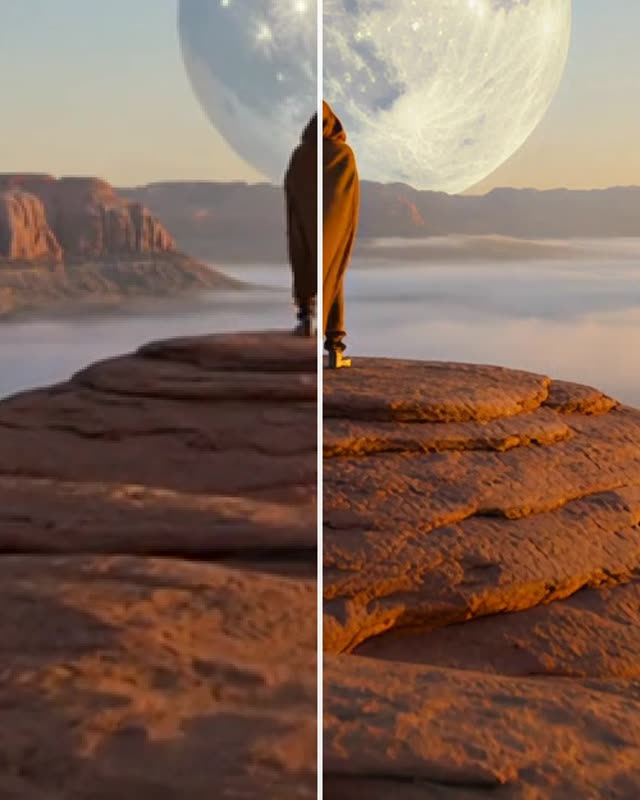
Real results (2026-10-11): each is one run of this tool on one of this site’s own AI-generated clips, shown next to its source. Phone footage has not been tested yet.
About video relighting on Cicadas
This tool relights a video you already have. Upload an MP4, pick one of four lighting presets (golden hour, neon night, soft studio or moonlight) and MiniMax H3 Max Relight re-renders the clip under that light while keeping the people, the movement, the framing and the sound. It costs 12.5 credits per second at 480P and 20 at 768P, the exact price is shown before anything is charged, and a job that fails is refunded in full.
Other edits of your own clip: the video background remover, the object remover and the AI video upscaler; blur video runs in the browser for free.
Why use Cicadas for video relighting
Relight a video without reshooting it
The model keeps what is in your clip and changes the light on it. In our runs a couple in an orange studio kept their faces, hair and clothes under pink and cyan neon, and a desert walk at sunset became a moonlit one with the same dunes and footprints.
Four lighting presets, each with its reference
Golden hour, neon night, soft studio and moonlight. Each preset sends the model a small lit ball as its lighting reference; you can see that ball next to the preset. There is no prompt to write, and how strong the change looks depends on your clip: on an already dark night scene, golden hour was subtle.
See the video relighting price before you pay
The model returns 24 frames a second and trims up to 0.7 seconds off the end, and you pay only for the seconds that come back: a 5.04-second clip returns 4.46 seconds, which is 56 credits at 480P or 90 at 768P. The quote holds for 5 minutes and a failed job returns every credit.
How to use video relighting
- 01
Sign in and upload your own MP4: 2.5 to 15 seconds, up to 48 MB.
- 02
Pick the light and the output size (480P or 768P), confirm you may use the video, and get the exact credit quote.
- 03
Confirm, wait a minute or two, then download the MP4 or reopen it later from Recent jobs.
What it costs
| This page: relight video at 480P | 12.5 credits per second | A 5.04-second clip returns 4.46 seconds: about 56 credits. A job that fails, or returns the wrong length, is refunded in full. Needs an account. |
|---|---|---|
| This page: relight video at 768P | 20 credits per second | The same clip is about 90 credits. The four lighting presets cost the same. |
| Credits | See the pricing page | One account and one credit balance for every tool on this site. |
The quote on the page is what counts: the server measures your clip, prices the seconds the model will return, and charges only when you confirm.
Video relighting FAQ
Tested on Cicadas · reviewed 2026-10-11
Real runs on 2026-10-11 with MiniMax H3 Max Relight, all on this site's own AI-generated clips. Through this page's paid path on a production build: a 5.04-second desert walk under moonlight (56 credits, returned as 4.46 seconds after 76 seconds) and a 5.04-second night portrait under soft studio (56 credits, 54 seconds), both at 480P. Sent with the request this page sends: the same portrait under golden hour and a 10.14-second clip with two people under neon. People, clothes, movement and sound were kept in every run. The change was strong on the desert and neon clips and subtle on the dark night portrait. 768P returned a 1344 × 768 clip in one direct request made with a different frame-shape setting and has not been run through this page. Phone footage, clips over 10 seconds and unusual frame shapes have not been tested.
Updated Oct 27, 2026 · How we test
Related tools
AI Video Upscaler
Upscale video to twice its width and height and get a private silent MP4. This AI video upscaler runs SeedVR2 at 0.25 credits per output megapixel.
Tested 2026-09-29

Video Background Remover
Remove the background from video clips of up to 10 seconds and download a transparent WebM. This video background remover shows the exact credit quote first.
Tested 2026-09-29

Remove Objects from Video with AI
Draw a box, name the object and AI erases it while the background is filled in. MP4 at your resolution; exact quote first, refund if nothing is found.
Tested 2026-09-29
AI Video Extender
Extend a video by 6 seconds, with generated audio on the new part. This AI video extender runs Grok Imagine Extend for a flat 143 credits per extension.
Tested 2026-09-29