
Creative workflows
How to Put Yourself in an AI Video: What 61 Clips From Photos of People Showed
Two ways to put yourself in an AI video, first frame or reference, what our 61 recorded clips kept and lost of a face, which photo works, and the lines we do not cross.
Video examples here were generated on Cicadas and keep their model, settings and date. Cicadas earns money when you generate with these models. How we test
- Test window:
- 2026-09-27 – 2026-10-30
- Clips recorded with these models:
- 160
- Models:
- MiniMax H3 Max
- Their provider cost:
- ≈$46.08
- Selection:
- every clip we keep is listed with its settings, cost and request ID; failed or discarded runs are listed in the test record.
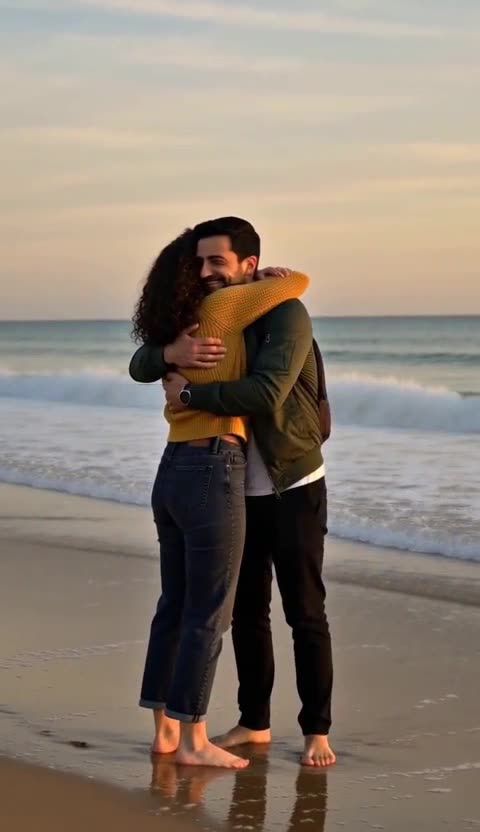
Short answer: there are two ways to put yourself in an AI video. On a first-frame page your photo is the opening frame and starts to move, so your face stays exactly as photographed but the place stays too. On a reference page the model uses your photo as a guide and draws you into a new scene, so you can dance on a beach or hug your older self, at the cost of a redrawn face. In the 61 clips we recorded from photos of people on Cicadas, the reference mode kept the face, hair and clothes in most clips, lost them when the scene itself transforms the face, and sometimes added a voice or a passer-by nobody asked for.
We make Cicadas, an AI video site that runs MiniMax H3 Max and other models through fal.ai. Every clip below was made from AI-made sample photos of fictional adults (and, on two keepsake pages, a fictional child or toddler photo), sent once with the page's exact prompt and described after we watched it. We name each clip so you can watch it on its page.
1. Two mechanisms, two different promises
| | First frame (image to video) | Reference (reference to video) | |---|---|---| | What your photo does | becomes frame one and moves | guides the model, which draws you anew | | The place | your photo's background, kept | a new scene the page describes | | Your face | exactly as photographed | redrawn; usually close, sometimes off | | Good for | a small change to a real photo | putting you somewhere else | | Our clips from photos of people | 10 | 51 |
First-frame pages are the safe choice when the photo itself matters. On the bouncy hair page and the crying filter page the portrait you upload is literally the first frame; the hallway, the light and the face stay, and only the hair or the expression moves. The talking photo page works the same way, adding speech.
Reference pages are what most people mean by "put me in a video". 39 pages on the site offer this mode, from dances to keepsakes (a few of them for pets). The prompt names you as "the person from Image 1" and describes a new scene; the model draws that scene with you in it.
2. What stayed and what drifted
Across the 51 reference clips, the descriptions we wrote after watching say the face, hair and outfit followed the photo in the large majority. Some examples worth watching:
- One photo, one new place. In
costume-walkon the Halloween costume page the man walks down a pumpkin-lined street in a vampire cape; his beard and short dark hair match the photo. Inbirthday-candleson the birthday page the woman blows out three candles and laughs; her curls and jumper carry over. - Two photos, two people. In
couple-beachon the couple page the two walk the waterline and hug; her curls and mustard sweater and his beard and green jacket match the photos. That clip is this guide's cover. - One photo, several shots. In
gas-dance-night-soloon the gas station dance page one photo plays all three roles and the same face and green jacket hold across a dance, a selfie and a car exit. With three photos (gas-dance-dusk-trio) each role keeps the face and outfit of its own photo.
Likeness dropped in four situations, all of them built into the scene:
- The scene changes the face on purpose. In
zombie-friend-hugon the zombie trend page the zombie has a generic zombie face, so until the cut the friend is recognisable only by his clothes. Inzombie-couple-roadon the zombie couple page the man's face, hair and jacket do survive under grey skin, so the result depends on the take. - Age. On the age progression page,
age-portraitturns dark curls grey and then white until she looks about eighty; the jumper and pose keep the clip tied to the photo. - An odd body. On the human pigeon page the head in
human-pigeon-benchis far larger than a pigeon's and keeps smiling instead of pecking. - Props over the face. In
costume-ghostthe sunglasses end up on her face, so only part of it shows.
3. Which photo works
Every clip here was made from the same few sample photos, all front-facing, evenly lit and of one person, so we have not tested other kinds. The list below is what reference mode needs, as advice rather than a measured result:
- Front-facing, the whole face visible. The reference has to show the features the model will redraw. Three-quarter views and hair across the eyes leave it guessing.
- Even light. Strong shadows get redrawn as features.
- Only you in the frame. A second face in the photo competes with yours. For two people, use two photos.
- Clothes you want to keep. Outfits carried over in almost every clip, so the photo also chooses what you wear, unless the scene gives you a costume, as the elf and vampire pages do.
4. How the prompts that worked are written
Reference pages ship their scenes, and on many of them the scene is fixed so it cannot be rewritten into something else. Where you can edit, the prompts that held in our clips share a shape:
- Format first: "Vertical phone footage in a warm living room" (the elf dance page) or "A locked-off full-body shot".
- You, by reference: "The person from Image 1", plus "the person from Image 2" for a second photo.
- One action: walk up and hug, blow out the candles, lift a glass. Long lists of moves came back loose: in
dance-studioon the AI dance page he bounced, swept his arms and turned, but not the exact list we wrote. - One continuous shot, unless the page is built around cuts.
- Sound, described as the room's noise.
Keep it to plain sentences. Labels and bracketed notes can end up in the picture or the voice.
5. The things the model adds
Reference mode draws the whole scene, so it fills gaps with its own ideas. From our clips:
- A voice nobody asked for. On the rain dance page the prompt asked for no vocals and the model added a soft sung voice in
raindance-pier; inraindance-solothe mouth follows that generated voice, not a song. Inhotel-lobby-dueton the hotel lobby page it added a rapped voice in made-up words. - Extra people. In
bulin-nighton the Bulin 47 page the onlookers are invented and look alike. - Screens that show you. In
babydoll-soloon the Babydoll dance page the phone on the shelf displays her own picture. - Timing. In
younger-self-bench-hugthe hug comes only in the last second; incouple-danceneither rests a head on the other's shoulder as the scene asks; inheads-hallwayon the Heads Will Roll page the two dance together but not in sync.
None of these ruined a clip, but each would look wrong in a post. Watch and listen to the whole clip first.
6. Length and cost
| Length | Our reference clips | What fits | |---|---|---| | 5 seconds | 35 | one action: a hug, a toast, a few steps | | 10 seconds | 14 | two beats, or three short shots | | 15 seconds | 2 | three shots of about five seconds |
Five seconds is a few moves, not a routine: in bulin-plaza she grooves for a handful of steps. On MiniMax H3 Max, a 5-second clip at 480P is 63 credits, about $0.62 on the $9.90 first pack; each page shows its exact quote before you generate, and a failed generation returns its credits.
7. The lines we do not cross
- Your photo, or an adult who agreed. Every reference request carries a consent confirmation. Do not upload someone who did not say yes.
- No celebrities or public figures. The confirmation you tick on most of these pages says it in so many words: "No celebrities, public figures or children."
- Children only where a page is built for it. The hug my younger self page takes a childhood photo of you; the grow up page takes a childhood photo of you or of your own child; the birthday page also takes your own child if you are the parent or legal guardian.
younger-self-polaroidandgrow-then-to-noware made from a fictional childhood photo. Other people pages ask for adults. - Not face swap. Nothing here puts your face into someone else's video or footage, and these pages do not target face-swap or head-swap searches. The model draws a new scene from your own photo.
- No trend songs. Dance pages make an original beat; add music you have the right to use.
- Label it. A clip of you in a place you never stood is AI. Say so when you post it.
How we tested
All 61 clips cited or counted here were generated on Cicadas through fal.ai between October 5 and October 28, 2026, all on MiniMax H3 Max, from AI-made sample photos of fictional adults (/showcase/refs/sample-woman.jpg, sample-man.jpg, sample-friend.jpg) and, on the two keepsake pages, a fictional child or toddler photo (sample-child.jpg, sample-toddler.jpg). Each request was sent once with the page's exact prompt; when a clip is a second take, its page says so. The counts come from the clips we had recorded up to October 28, 2026. The method is on how we test.