
Model updates
MiniMax H3 vs Seedance 2.5: Input Choices
Choose by available inputs, duration and resolution, then inspect two recorded yellow-corridor takes from the same text prompt. One case establishes no overall winner.
The yellow-corridor examples were recorded directly in the supplier Model Lab, with model, settings, date and charges retained. They do not test Cicadas debit or download flows. Cicadas earns money when you generate.
- Test window:
- 2026-09-22 – 2026-10-25
- Clips recorded with these models:
- 149
- Models:
- MiniMax H3 Max, Seedance 2.5
- Their provider cost:
- ≈$55.33
- Selection:
- every clip we keep is listed with its settings, cost and request ID; failed or discarded runs are listed in the test record.
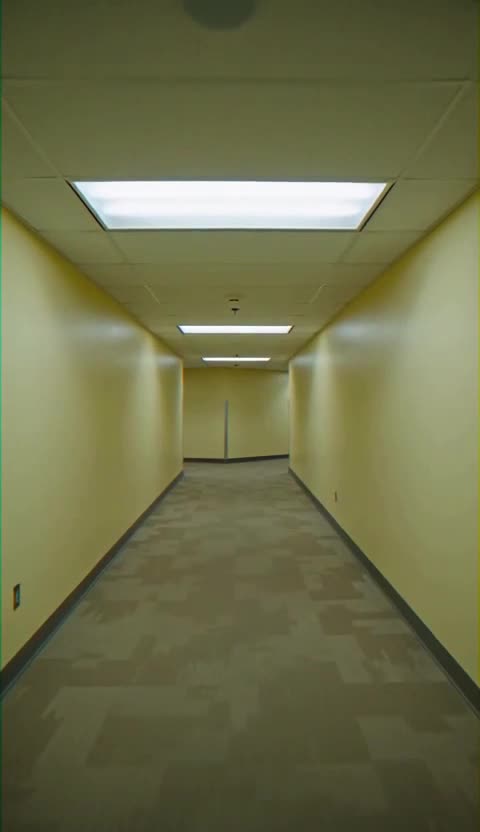
Cover: the MiniMax H3 Max take recorded October 25, 2026 for the yellow-corridor example below. The later lamp or bag brief remains an untested proposal.
If your question is “MiniMax H3 or Seedance 2.5?”, start with what you already have. On Cicadas, MiniMax H3 runs fal's H3 Max variant. Its separate reference-to-video workflow can use subject photos in a newly described scene. Seedance 2.5 offers text or a starting image and durations up to 30 seconds. This is a comparison of the workflows available here, not a claim that H3 Max and standard H3 are interchangeable or that one wins a visual benchmark.
One recorded yellow-corridor prompt
Recorded October 25 directly in the supplier Model Lab. Both used the exact English prompt below, text input, a requested 5 seconds, 9:16 and audio on. These recordings are not a Cicadas checkout, debit or download-flow test. Both selected a 480 resolution tier; actual pixel dimensions and durations differ.
First-person found-footage shot in an original empty maze of faded yellow corridors. Low tiled ceiling, fluorescent fixtures, worn carpet, a slow cautious walk with slight handheld sway. Five seconds, one continuous shot with a clear path ahead. Sound: faint fluorescent hum and soft footsteps. No people, creatures, logos, writing or cuts. VHS grain as a visual texture, not a date overlay.
| Model | Requested settings | Actual pixels / duration | Supplier charge for this take | Request ID |
|---|---|---|---|---|
| MiniMax H3 Max | Requested settings5s · 480P · 9:16 · audio on | Actual pixels / duration480×832 / 5.18s | Supplier charge for this take$0.1625 | Request ID01a171ad-7c85-79b1-9121-468b04b628c8 |
| Seedance 2.5 | Requested settings5s · 480p · 9:16 · audio on | Actual pixels / duration480×854 / 5.06s | Supplier charge for this take$1.036552 | Request ID01a171b8-6d41-71e3-870c-f93d3d600a54 |
These are the actual supplier charges for these requests, not Cicadas credit quotes. Model-wide sample counts in the header remain historical records, not the number of matched tests here.
H3 produced a brighter, cleaner corridor in this take; Seedance produced a darker, more worn space. Inspected frames show slow forward movement without an obvious person appearing or a cut. Both have weak VHS grain. All files were completely downloaded and decoded; audio content has not been independently heard, so footsteps, hum, music and sound synchronization remain unscored. One prompt and one take per model establish no overall winner.
MiniMax H3 Max
Seedance 2.5
The two web videos retain their downloaded supplier bytes.
The input is the main decision
| Task or control | MiniMax H3 Max here | Seedance 2.5 here |
|---|---|---|
| Invent a scene from text | MiniMax H3 Max hereAvailable | Seedance 2.5 hereAvailable |
| Animate a starting image | MiniMax H3 Max hereAvailable | Seedance 2.5 hereAvailable |
| Use subject photos in a new scene | MiniMax H3 Max hereSeparate reference-to-video tool, up to 3 photos | Seedance 2.5 hereNot offered on this page |
| Duration choices | MiniMax H3 Max here5, 10 or 15 seconds | Seedance 2.5 here4, 5, 10, 15 or 30 seconds |
| Resolution choices | MiniMax H3 Max here480P or 768P | Seedance 2.5 here480p or 720p |
| Generated audio | MiniMax H3 Max hereAlways on | Seedance 2.5 hereSelectable |
The H3 Max API, reference-image API and Seedance 2.5 API identify the supplier interfaces. The table describes Cicadas' controls, which can be narrower than the supplier schema. Read the actual quote and available settings on the selected tool before making a request.
Starting image or reference subject?
These are different jobs. A starting image gives the model an opening composition to animate. Use it when the position, framing and surrounding scene of a photograph should be the starting point. Both model pages offer that input.
A reference photo says who or what should appear in a newly described composition. On the reference-to-video page, upload the permitted subject images, refer to them as Image 1, Image 2 and so on, and describe the new location and action. Reference images do not guarantee exact geometry or identity in every frame. The generic H3 model page does not become a video-input or character-swap tool because the preset also has a reference-image endpoint.
For a real product, decide whether you need to retain the photographed composition or place that product in a new scene. The first requirement points to image-to-video. The second calls for a permitted subject-reference workflow and closer inspection of shape, labels and identity.
Example: the same lamp, two different questions
Suppose you own a photograph of a ceramic lamp on a desk. If you want the lamp to stay exactly where it starts while its light brightens, test an image-input brief on either model page:
The single ceramic lamp stays on the desk as its warm light slowly brightens. Preserve the lamp outline, shade shape and desk edges. Locked camera, one continuous shot, no extra objects, no cuts or lettering.
This is an untested draft. To compare it, use the same source image, a shared 5-second duration and the nearest suitable low-resolution setting. H3 Max's and Seedance's output options differ; record the exact selected settings instead of calling them identical. Since H3 Max always includes generated audio, enable Seedance's audio for that comparison, or judge the pictures separately and label the audio mismatch.
If you instead want the same lamp in a different room, the old composition is no longer the goal. Use H3 Max reference images, name Image 1 as the lamp and describe the new room. That is a different task, so it should not be scored as a matched comparison against a starting-frame request.
Duration changes the brief
H3 Max here offers 5, 10 or 15 seconds. Seedance 2.5 adds 4 and 30 seconds. A 30-second continuous shot can suit a slow reveal, but length alone does not prove the subject will stay consistent. A 5-second check is easier to inspect before committing to a long take.
Do not describe four cuts merely to fill a longer option. Write one action with a clear stopping point. Check motion and identity across the entire downloaded clip; a good opening frame does not establish a good ending.
Inspect the result without inventing a winner
Record the source, prompt, mode, duration, resolution, audio choice, quoted credits and the reason you accepted or rejected the result. Check the lamp silhouette, object count, changing light and stable background. Use video-to-frames for an early, middle and late frame.
The yellow-corridor case above records one shared text prompt; it does not test the proposed lamp brief. The H3 Max guide has recorded examples of different briefs; the same-prompt article documents its own model/input combinations. Those examples are useful context, not evidence that either model wins the lamp task above.
When the requirement becomes an exact action from an existing clip, use Motion Control AI with your permitted motion reference. Neither H3 Max reference photos nor Seedance's starting image supplies the frames of an uploaded video.
Questions before you generate
Is MiniMax H3 here the same as H3 Max?
The MiniMax H3 route on Cicadas uses fal’s H3 Max endpoints. This article compares that configured variant with Seedance 2.5, not every MiniMax H3 version.
Which should I use for a specific subject in a new scene?
Cicadas has a separate H3 Max reference-to-video tool for up to three subject photos. Inspect the resulting identity and geometry; reference input is not a guarantee.
Can I turn generated audio off in H3 Max?
H3 Max has generated audio always on in this workflow. Seedance 2.5 exposes an audio choice, so record the difference when comparing results.
Does H3 reference input replace a character in my video?
No. That endpoint takes reference images and generates a new scene. It is not the separate H3 Character Swap LoRA workflow or a video replacement editor.
Which model produced the better lamp test?
This article proposes that test but has not generated it. It provides settings and inspection criteria, with no invented result or speed ranking.