
Pet videos
How to Make Your Dog Talk With AI (From One Photo)
Make your dog, cat or any pet talk with AI: one photo plus a short recording of the words. What to photograph, how to record, what it costs and what the mouth really does.
Video examples here were generated on Cicadas and keep their model, settings and date. Cicadas earns money when you generate with these models. How we test
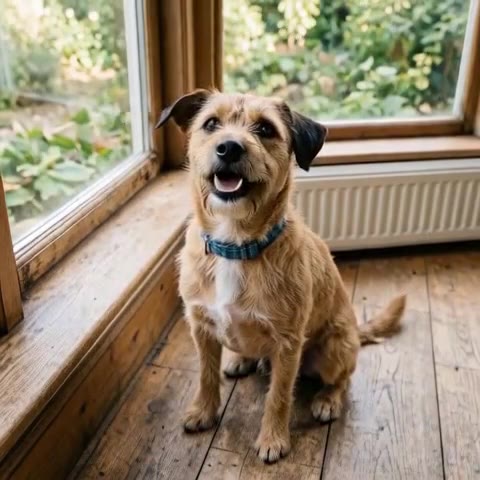
Short answer: one photo of your dog facing the camera, one short recording of the words in your own voice, and the talking pet AI page does the rest: MiniMax H3 Max keeps the photo as the first frame and moves the mouth while your recording plays. A 5-second clip is 63 credits, about $0.62 on the $9.90 first pack, and the price is shown before you generate.
This guide is about the Cicadas workflow, which we make. Where other apps differ (a built-in text-to-speech voice, a template), we say so, but we have not tested them.
1. Pick the photo
- One animal, one photo. People in the frame are not accepted on the talking pet page, so crop them out first.
- Face to the camera, mouth visible, head not cut off. A sitting dog works best because the model mostly moves the head and the mouth.
- Even light. Dark fur in a dim room loses the mouth; a window or a lamp from the front fixes it.
- Vertical photo, vertical clip. The clip keeps the photo's shape, so shoot 9:16 for TikTok, Reels and Shorts.
2. Record the words
- Say the line yourself on your phone: MP3, WAV or M4A, at least 2 seconds, up to 15 MB. No song is included and no synthetic voice is generated; the clip's sound is your recording, unchanged.
- Keep it short. One or two sentences read naturally; a 5-second clip fits about 12 words, and the length follows the recording (you can change it to 10 or 15 seconds).
- Pause at the end. The mouth keeps moving for roughly half a second after the sound stops, so a beat of silence at the end looks better than a hard cut.
3. Generate and download
- Sign in on the talking pet AI page and add the photo.
- Attach the recording and tick that it is yours or that you may use it.
- Check the quote (63 credits for 5 seconds at 480P; 125 and 188 for 10 and 15 seconds), generate, and download the MP4 from My videos. A failed generation returns its credits.
The sample above is the recorded H3 Max talking-pet clip from the tool page: one phone photo, one line, 5 seconds.
What the mouth really does
The movement follows the sound of the recording loosely, not word by word. Consonants do not map to lip shapes the way a human lip-sync model does; what you get is a pet whose mouth opens and closes in time with your voice, with small head movements. That is enough for the "my dog answering back" format, and it is why short, expressive lines beat long speeches.
Talking animal, not only dogs
The same steps work for cats, rabbits, horses and birds: one clear photo, mouth visible. Fur and feathers animate more naturally than scales. For a pet that argues with the camera to your own recording, the Bad Times for pets page uses the same recording step with a close-up framing.
Rights and privacy
Use your own pet's photo or one the owner agreed to, and your own recording or audio you may use. Your clips stay in your account; they are not shown publicly. Paid clips download without a watermark.