
Best Image to Video AI, Tested on One Photo
Which image to video AI follows your prompt? We gave one kitten photo and one prompt to 6 models on Cicadas. See every clip and price, then try any of them.
- From 57 credits per clip
- Image to video
- 5s / 10s / 16s
- 540p
- Audio available
Sample result
5s · MP4About Best image to video AI on Cicadas
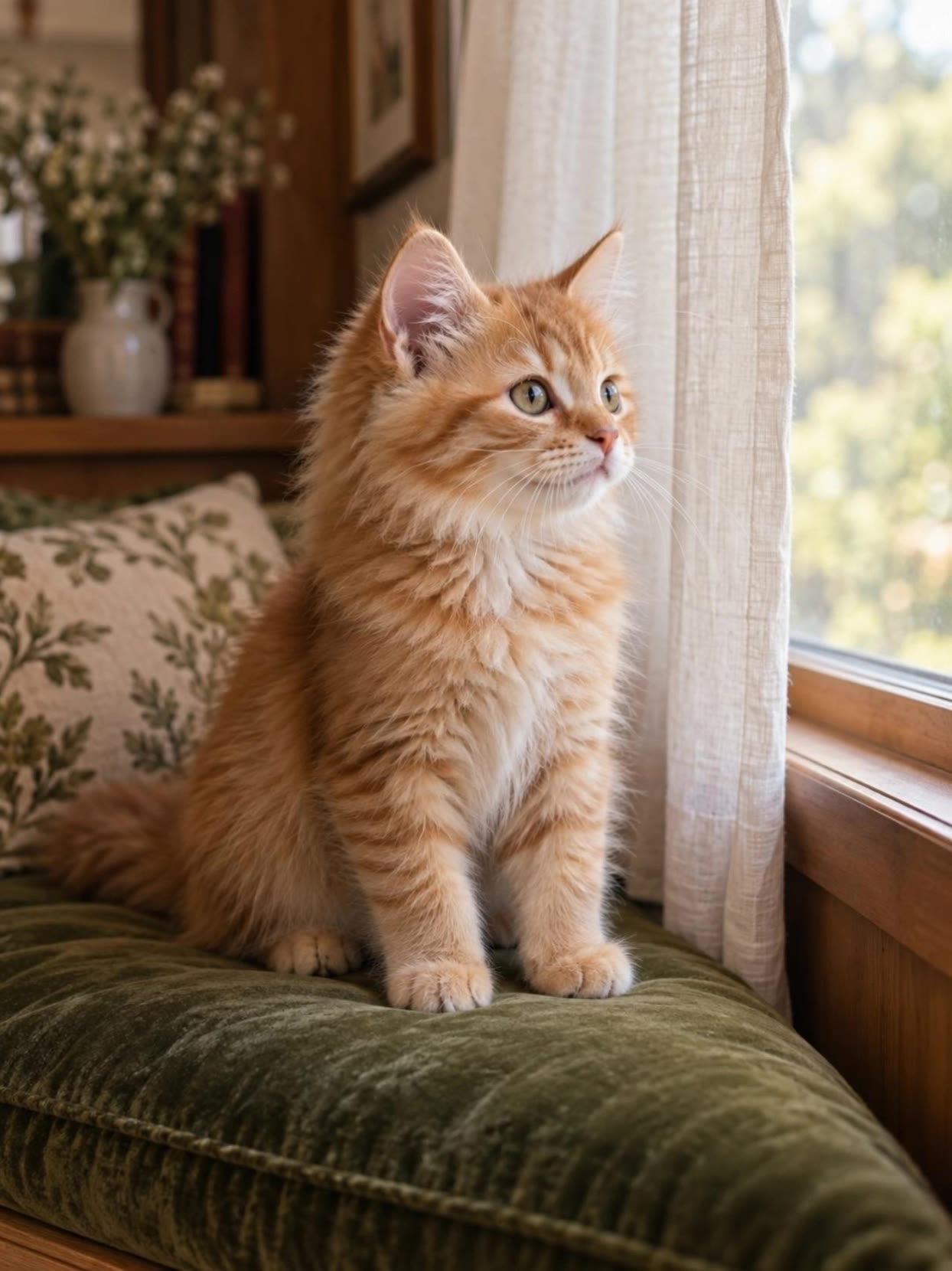
We gave six image to video models the same photo, a ginger kitten on a green cushion by a window, and the same prompt: one blink, a small head tilt toward the window, paws planted, locked camera. Vidu Q4 and Kling 3.0 Pro kept to the small movement. MiniMax H3 Max made the blink, then turned its head all the way to the window. Luma Ray 3.2 and PixVerse v6 turned the whole head too, and Vidu Q3 turned it from side to side. All six kept the photo's 3:4 shape. A 5-second clip cost from 38 to 193 credits. One photo and one run per model is a single data point, not a ranking: watch the clips below and try your own photo on any of the five models in the form.
Best image to video AI examples made on Cicadas
The kitten test on MiniMax H3 Max.
MiniMax H3 Max at 480P, 5 seconds, from the kitten photo and prompt of the Kling, Vidu and Luma kitten clips. The kitten blinks as asked, then turns its head fully to the window rather than the small tilt; the paws stay planted and the room stays as in the photo. The clip keeps the photo's 3:4 shape (480 × 640); its sound track is close to silent.
Use this recipe ↗The kitten, on Vidu Q4.
Vidu Q4 at 540p, from the kitten photo and prompt of the Kling, Seedance and Vidu Q3 kitten clips. The kitten makes the small head movement the prompt asks for and the room stays as in the photo; the clip keeps the photo’s 3:4 shape (622 × 830). Its sound track is close to silent.
Use this recipe ↗That curious little look.
An earlier Kling pet animation. Its recorded settings say 9:16, but the downloaded file is 1244×1660, following the source image at about 3:4. This is a separate output from the Seedance test.
Use this recipe ↗The kitten, on Luma Ray 3.2.
Luma Ray 3.2 at 540p, 5 seconds, silent, from the kitten photo and prompt of the Kling, Seedance and Vidu kitten clips; back in 72 seconds. The room and the fur stay as in the photo, but the kitten turns its whole head to the window, further than the small tilt the prompt asked for. The clip keeps the photo's 3:4 shape (624 × 832).
Use this recipe ↗The kitten, on PixVerse v6.
PixVerse v6 at 720p, silent, from the kitten photo and prompt of the Kling and Vidu kitten clips. The paws stay planted, but the kitten turns its whole head to the window rather than tilting it a few degrees, and the framing creeps closer although the prompt asked for a locked camera.
Use this recipe ↗The kitten, on Vidu Q3.
Vidu Q3 at 720p, silent, from the kitten photo and prompt of the Kling and Seedance kitten clips. The kitten moves more than asked, turning its head from side to side instead of one small tilt; the video keeps the photo’s 3:4 shape.
Use this recipe ↗Why use Cicadas for Best image to video AI
How we tested
One photo, one prompt, one run per model, all generated on Cicadas: Kling 3.0 Pro on 2026-09-08, Vidu Q3 on 2026-09-30, PixVerse v6 on 2026-10-01, Vidu Q4 and Luma Ray 3.2 on 2026-10-11, MiniMax H3 Max on 2026-10-16. Each clip keeps its request ID in the test log.
Who followed the prompt
The prompt asked for a small head tilt. Vidu Q4 and Kling 3.0 Pro did that. MiniMax H3 Max blinked as asked, then turned its head fully to the window; Luma Ray 3.2 and PixVerse v6 also turned the whole head, and PixVerse let the framing creep closer; Vidu Q3 turned the head from side to side.
What it costs
For the clips on this page: Luma Ray 3.2 38 credits, Vidu Q4 57, PixVerse v6 57, MiniMax H3 Max 63, Kling 3.0 Pro 140 and Vidu Q3 193, each for 5 seconds at the settings in the table. The form shows the exact quote for your settings before you generate.
How to use Best image to video AI
- 01
Pick a model and upload one photo.
- 02
Describe only the movement you want, and check the quote.
- 03
Sign in, generate, and download the MP4 from My videos.
Best image to video AI prompt ideas
Copy one into the prompt box above and adapt it to your shot. Or write your own shot by shot in the prompt generator.
“The ginger kitten blinks once and slowly tilts its head a few degrees toward the window as if listening. Gentle natural breathing and a tiny ear twitch. Both front paws stay planted on the green cushion; body remains seated. Locked camera. Preserve face, fur pattern, whiskers and exact kitten anatomy. Calm natural movement, no extra limbs, no mouth opening, no cuts, no added objects.”
“The woman gently turns her head a few degrees and blinks once. Fine rain runs down the translucent amber hood. City bokeh stays soft and stationary. Subtle breathing, locked camera, natural facial movement. Preserve her identity and clothing, no cuts.”
“Thin translucent steam rises slowly from the coffee and curls naturally in the warm side light. The camera makes a very gentle forward push toward the cup and croissant. The ceramic cup, handle, saucer and pastry remain rigid and completely stationary. Preserve all food textures. Cozy editorial food commercial, single continuous shot, no cuts, no added objects, no text.”
One kitten photo, one prompt, six models
| What it did | This 5-second clip | |
|---|---|---|
| Vidu Q4 | What it did540p. Made the small head movement the prompt asks for; the room stayed as in the photo | This 5-second clip57 credits |
| Kling 3.0 Pro | What it didSilent. Stayed seated and turned its head slightly toward the window and back | This 5-second clip140 credits |
| MiniMax H3 Max | What it did480P. Blinked as asked, then turned its head fully to the window | This 5-second clip63 credits |
| Luma Ray 3.2 | What it did540p, silent. Kept the room and fur, but turned the whole head to the window | This 5-second clip38 credits |
| PixVerse v6 | What it did720p, silent. Paws stayed planted, the whole head turned, and the framing crept closer | This 5-second clip57 credits |
| Vidu Q3 | What it did720p, silent. Moved more than asked, turning its head from side to side | This 5-second clip193 credits |
The prompt asked for one blink, a small head tilt toward the window, paws planted and a locked camera. One run per model; the credits are what each clip's settings cost today.
Best image to video AI FAQ
Tested on Cicadas · reviewed 2026-10-17
One photo (a ginger kitten on a green cushion by a window) and one prompt, one run per model on Cicadas: Kling 3.0 Pro (2026-09-08, silent), Vidu Q3 (2026-09-30, 720p, silent), PixVerse v6 (2026-10-01, 720p, silent), Vidu Q4 and Luma Ray 3.2 (2026-10-11, 540p) and MiniMax H3 Max (2026-10-16, 480P, recorded for this page). The five earlier clips were made for their model pages and the same-prompt post; their descriptions there match this page. Twelve frames of the Kling and H3 clips were read for this page. One photo and one run per model is not a ranking; other subjects and bigger motion were not tested here.
Updated Oct 17, 2026 · How we test
Related tools
 Kling 3.0 Pro · Recorded Cicadas sample
AI Image to Video Generator
Photo to video from one upload: add a JPG, PNG or WebP and get a silent 5-second Kling or 6-second 720p Veo MP4. AI image to video with the price shown first.
Kling 3.0 Pro · from 140 credits
Tested 2026-09-29
 Kling 3.0 Pro · Recorded Cicadas sample
Animate Photo AI
Make a still photo move with animate photo AI: pick one small motion and get a silent 5- or 10-second MP4. Photo to video on Kling 3.0 Pro, price shown first.
Kling 3.0 Pro · from 140 credits
Tested 2026-09-29
 Vidu Q4 · Recorded Cicadas sample
Vidu Q4 AI Video Generator
Try Vidu Q4 image to video: turn one image into 5, 10 or 16 seconds at 540p, 720p or 1080p with a sound track. Vidu Q4 clips start at 57 credits for 5 seconds.
Vidu Q4 · from 57 credits
Tested 2026-10-11
 Kling 3.0 Pro · Recorded Cicadas sample
Kling 3.0 Pro AI Video Generator
Turn a prompt or one image into a 5- or 10-second video with Kling 3.0 Pro. Add sound if you like and see the exact credit quote before you generate.
Kling 3.0 Pro · from 140 credits
Tested 2026-10-16